> For the complete documentation index, see [llms.txt](https://docs.aic-eec.com/llms.txt). Markdown versions of documentation pages are available by appending `.md` to page URLs; this page is available as [Markdown](https://docs.aic-eec.com/biil_psoc6/sensor-interfacing-and-hmi/bdh-shell/capsense-button-and-slider/capsense-button-and-slider-using-freertos.md).

# CAPSENSE Button and Slider using FreeRTOS

## L*ab Objective:*

&#x20;   In this lab, participants will integrate the Infineon PSoC 6 microcontroller's CAPSENSE functionalities with FreeRTOS, a real-time operating system. Participants will develop touch-responsive interfaces, including buttons and sliders, utilizing the CAPSENSE capabilities. By incorporating FreeRTOS, they will learn to manage concurrent tasks efficiently, ensuring smooth and responsive touch interactions. This lab aims to showcase the synergy between capacitive touch technologies and real-time operating systems, emphasizing the benefits of multitasking in enhancing user interface performance and overall system efficiency.

## 🔥 Requirements

<table><thead><tr><th width="429">Resources</th><th>Links</th></tr></thead><tbody><tr><td>Computer</td><td>💻</td></tr><tr><td>ModusToolbox™ software v3.0 or later</td><td><a href="https://www.infineon.com/modustoolbox">Link</a></td></tr><tr><td>CY8CKIT-062S2-43012 Infineon Board</td><td><a href="https://github.com/Advance-Innovation-Centre-AIC/BIIL_MTB-100_Hello_World_and_LED_Blinking_Programming_Template/assets/88732241/0215501d-b774-4045-8e64-ef49e28d8404">Link</a></td></tr><tr><td>Technical Report</td><td><a href="https://www.dropbox.com/scl/fi/amaxc94pte0ut2i1r5ewx/Technical-Report-Lab00.paper?rlkey=b3xm3vrerz9xgv1glb30cvy9z&#x26;dl=0">dropbox</a></td></tr></tbody></table>

## 🚩 Let start

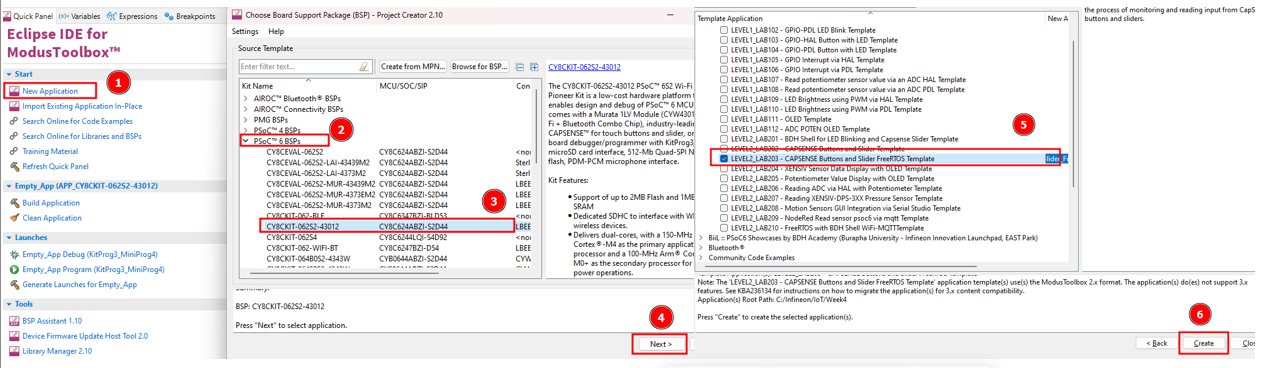
### Create Application

<figure><img src="https://1856353139-files.gitbook.io/~/files/v0/b/gitbook-x-prod.appspot.com/o/spaces%2F-MClo3nC-1US0rbK8Qau%2Fuploads%2FHfLRYttqHiDXW90M5wJH%2Fimage.png?alt=media&amp;token=7cb11bb1-0bfd-47f0-b74c-a40fa5c9f33b" alt=""><figcaption><p>Create Application</p></figcaption></figure>

### Coding

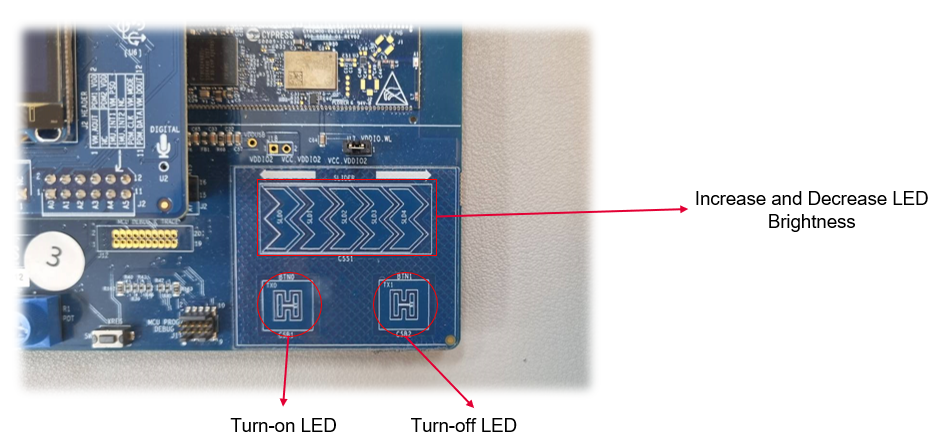
&#x20;   This code example features a 5-segment linear slider and two CAPSENSE™ buttons. Button 0 turns the LED ON, Button 1 turns the LED OFF, and the slider controls the brightness of the LED. The code example also demonstrates interfacing with the CAPSENSE™ Tuner using the I2C interface.

{% code title="main.c" fullWidth="false" %}

```c
#include "cybsp.h"
#include "FreeRTOS.h"
#include "task.h"
#include "queue.h"
#include "capsense_task.h"
#include "led_task.h"


/*******************************************************************************
 * Global constants
 ******************************************************************************/
/* Priorities of user tasks in this project. configMAX_PRIORITIES is defined in
 * the FreeRTOSConfig.h and higher priority numbers denote high priority tasks.
 */
#define TASK_CAPSENSE_PRIORITY (configMAX_PRIORITIES - 1)
#define TASK_LED_PRIORITY (configMAX_PRIORITIES - 2)

/* Stack sizes of user tasks in this project */
#define TASK_CAPSENSE_STACK_SIZE (256u)
#define TASK_LED_STACK_SIZE (configMINIMAL_STACK_SIZE)

/* Queue lengths of message queues used in this project */
#define SINGLE_ELEMENT_QUEUE (1u)


/*******************************************************************************
* Function Name: main()
********************************************************************************
* Summary:
*  System entrance point. This function sets up user tasks and then starts
*  the RTOS scheduler.
*
* Return:
*  int
*
*******************************************************************************/
int main(void)
{
    cy_rslt_t result;

    /* Initialize the device and board peripherals */
    result = cybsp_init();

    /* Board init failed. Stop program execution */
    if (result != CY_RSLT_SUCCESS)
    {
        CY_ASSERT(0);
    }

    /* Enable global interrupts */
    __enable_irq();

    /* Create the queues. See the respective data-types for details of queue
     * contents
     */
    led_command_data_q = xQueueCreate(SINGLE_ELEMENT_QUEUE,
                                      sizeof(led_command_data_t));
    capsense_command_q = xQueueCreate(SINGLE_ELEMENT_QUEUE,
                                      sizeof(capsense_command_t));

    /* Create the user tasks. See the respective task definition for more
     * details of these tasks.
     */
    xTaskCreate(task_capsense, "CapSense Task", TASK_CAPSENSE_STACK_SIZE,
                NULL, TASK_CAPSENSE_PRIORITY, NULL);
    xTaskCreate(task_led, "Led Task", TASK_LED_STACK_SIZE,
                NULL, TASK_LED_PRIORITY, NULL);

    /* Start the RTOS scheduler. This function should never return */
    vTaskStartScheduler();

    /********************** Should never get here ***************************/
    /* RTOS scheduler exited */
    /* Halt the CPU if scheduler exits */
    CY_ASSERT(0);

    for (;;)
    {
    }

}

```

{% endcode %}

#### FreeRTOS

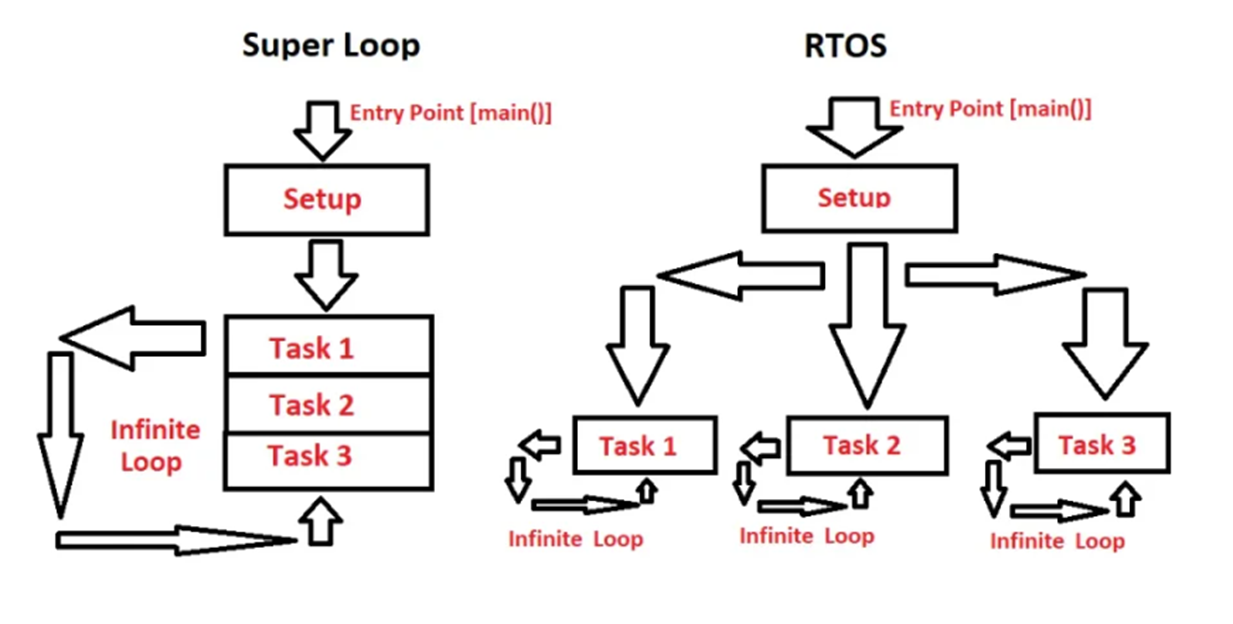
&#x20;   FreeRTOS is a real-time operating system for embedded devices, which provides a framework for building applications with multiple threads (tasks), and offers features like task scheduling, priority management, and inter-task communication mechanisms.

<figure><img src="https://1856353139-files.gitbook.io/~/files/v0/b/gitbook-x-prod.appspot.com/o/spaces%2F-MClo3nC-1US0rbK8Qau%2Fuploads%2FaLZbbye717jXxkpQjBKR%2Fimage.png?alt=media&amp;token=b57f7c04-b807-43f5-a0e4-82fcbded624b" alt=""><figcaption><p>Super Loop vs Real Time Operating System (RTOS)</p></figcaption></figure>

### Build Application

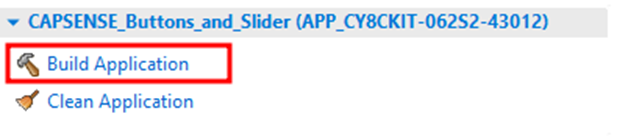
<figure><img src="https://1856353139-files.gitbook.io/~/files/v0/b/gitbook-x-prod.appspot.com/o/spaces%2F-MClo3nC-1US0rbK8Qau%2Fuploads%2FTb40l6lZSfrnFnE61rcA%2Fimage.png?alt=media&amp;token=882910e5-0aac-48a7-8f75-45c84e099317" alt="" width="464"><figcaption><p>Build Application</p></figcaption></figure>

### Launches Application

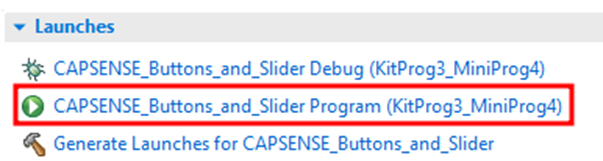
<figure><img src="https://1856353139-files.gitbook.io/~/files/v0/b/gitbook-x-prod.appspot.com/o/spaces%2F-MClo3nC-1US0rbK8Qau%2Fuploads%2FAGmDHzCvEQ3yJC4otR2k%2Fimage.png?alt=media&amp;token=a6b61c80-2833-4ca5-bccf-d936d07be5b0" alt="" width="452"><figcaption><p>Launches Application</p></figcaption></figure>

###

### Result&#x20;

<figure><img src="https://1856353139-files.gitbook.io/~/files/v0/b/gitbook-x-prod.appspot.com/o/spaces%2F-MClo3nC-1US0rbK8Qau%2Fuploads%2FydpFHETkoMkX7YehhT5l%2Fimage.png?alt=media&amp;token=18f579b5-2b6c-443a-b8c9-774eaa490689" alt=""><figcaption><p>Use Capsense to control the LED</p></figcaption></figure>

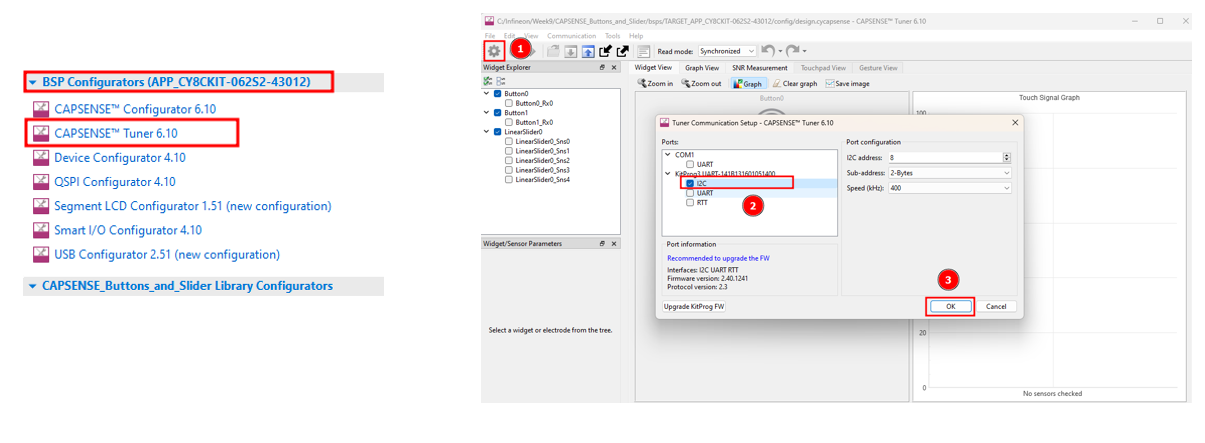
#### Open CAPSENSE Tuner

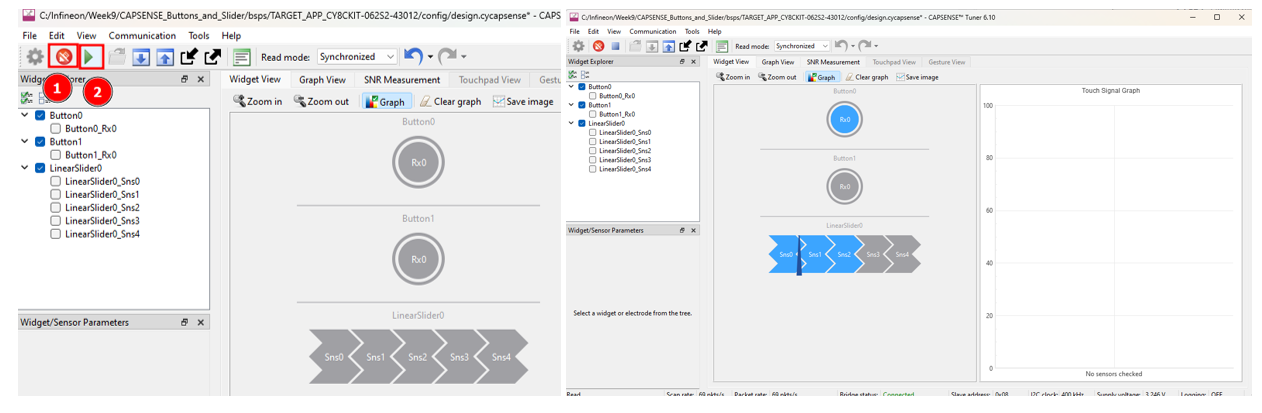
<figure><img src="https://1856353139-files.gitbook.io/~/files/v0/b/gitbook-x-prod.appspot.com/o/spaces%2F-MClo3nC-1US0rbK8Qau%2Fuploads%2F9eCdCPig12e2vhkDXLWm%2Fimage.png?alt=media&amp;token=d16e3e08-d8c2-4d21-9860-6578262a1b6a" alt=""><figcaption><p>Open Capsense tuner</p></figcaption></figure>

<figure><img src="https://1856353139-files.gitbook.io/~/files/v0/b/gitbook-x-prod.appspot.com/o/spaces%2F-MClo3nC-1US0rbK8Qau%2Fuploads%2FKK4cJ3MGCTKXArdxcx2z%2Fimage.png?alt=media&amp;token=a9fa8743-1fc1-468f-b338-848dc82f5bf3" alt=""><figcaption><p>Capsense tuner</p></figcaption></figure>

> #### 🎉 <mark style="color:blue;">Congratulations! You can now complete this lab</mark>

## Supported toolchains (make variable 'TOOLCHAIN')

* GNU Arm® embedded compiler v10.3.1 (`GCC_ARM`) - Default value of `TOOLCHAIN`
* Arm® compiler v6.16 (`ARM`)
* IAR C/C++ compiler v9.30.1 (`IAR`)

## Supported kits (make variable 'TARGET')

* [PSoC™ 62S2 Wi-Fi Bluetooth® pioneer kit](https://www.infineon.com/CY8CKIT-062S2-43012) (`CY8CKIT-062S2-43012`)
* [PSoC™ 62S1 Wi-Fi Bluetooth® pioneer kit](https://www.infineon.com/CYW9P62S1-43438EVB-01) (`CYW9P62S1-43438EVB-01`)
* [PSoC™ 62S1 Wi-Fi Bluetooth® pioneer kit](https://www.infineon.com/CYW9P62S1-43012EVB-01) (`CYW9P62S1-43012EVB-01`)
* [PSoC™ 62S3 Wi-Fi Bluetooth® prototyping kit](https://www.infineon.com/CY8CPROTO-062S3-4343W) (`CY8CPROTO-062S3-4343W`)

## Related resources

| Resources                       | Links                                                                                                                                                      |
| ------------------------------- | ---------------------------------------------------------------------------------------------------------------------------------------------------------- |
| ModusToolbox™ Software Training | [link](https://www.dropbox.com/sh/waj898o4o8eccx0/AAB3hBBaIQo2OvJ5-fubGJIha/training-modustoolbox-level1-getting-started-master/Manual/Ch2-Tools.pdf?dl=0) |

## Other resources

Infineon provides a wealth of data at [www.infineon.com](http://www.infineon.com) to help you select the right device, and quickly and effectively integrate it into your design.

## Document history

Document title: CAPSENSE Button and Slider using FreeRTOS<br>

<table><thead><tr><th width="149">Version</th><th>Description of change</th></tr></thead><tbody><tr><td>1.0.0</td><td>CAPSENSE Button and Slider using FreeRTOS</td></tr></tbody></table>

## Authors:

* *Assoc. Prof. Wiroon Sriborrirux*
* *Mr. Sriengchhun Chheang*
* *Mr. Sabol Socare*<br>

<br>

***

© BDH Corporation, 2022-2023


---

# Agent Instructions
This documentation is published with GitBook. GitBook is the documentation platform designed so that both humans and AI agents can read, navigate, and reason over technical content effectively. Learn more at gitbook.com.

## Querying This Documentation
If you need additional information that is not directly available in this page, you can query the documentation by asking a question.

Perform an HTTP GET request on the following URL with the `ask` and `goal` query parameters:

```
GET https://docs.aic-eec.com/biil_psoc6/sensor-interfacing-and-hmi/bdh-shell/capsense-button-and-slider/capsense-button-and-slider-using-freertos.md?ask=<question>&goal=<user_goal>
```

`ask` is the immediate question: it should be specific, self-contained, and written in natural language.
`goal` is what the user is ultimately trying to achieve, the reason they need the answer. Sharing it helps GitBook give you a better, more relevant answer. A goal is most helpful when it describes the outcome the user wants rather than restating the question. For example, with `ask=how do I create an API token`, a goal like `automate deployments from our CI pipeline` lets GitBook tailor the answer to that use case.

The response will contain a direct answer to the question and relevant excerpts and sources from the documentation.

Use this mechanism when the answer is not explicitly present in the current page, you need clarification or additional context, or you want to retrieve related documentation sections.