> For the complete documentation index, see [llms.txt](https://docs.aic-eec.com/llms.txt). Markdown versions of documentation pages are available by appending `.md` to page URLs; this page is available as [Markdown](https://docs.aic-eec.com/general/docker-os/docker-os-part-1.md).

# Docker OS Part 1

<figure><img src="/files/foWbcBuYX8KBA5JI387R" alt=""><figcaption><p>Docker AIC course : What is Docker </p></figcaption></figure>

## Introduction

Docker คือ แพลตฟอร์มที่ช่วยในการสร้าง และติดตั้งโปรแกรมซอฟต์แวร์รวมถึง OS และตัวจัดการต่างๆ โดยจะแยกออกจาก OS ที่เราใช้งานอยู่ ให้สามารถใช้งานในการพัฒนาได้ตามความต้องการของผู้ใช้ โดยที่มีองค์ประกอบพื้นฐานดังนี้
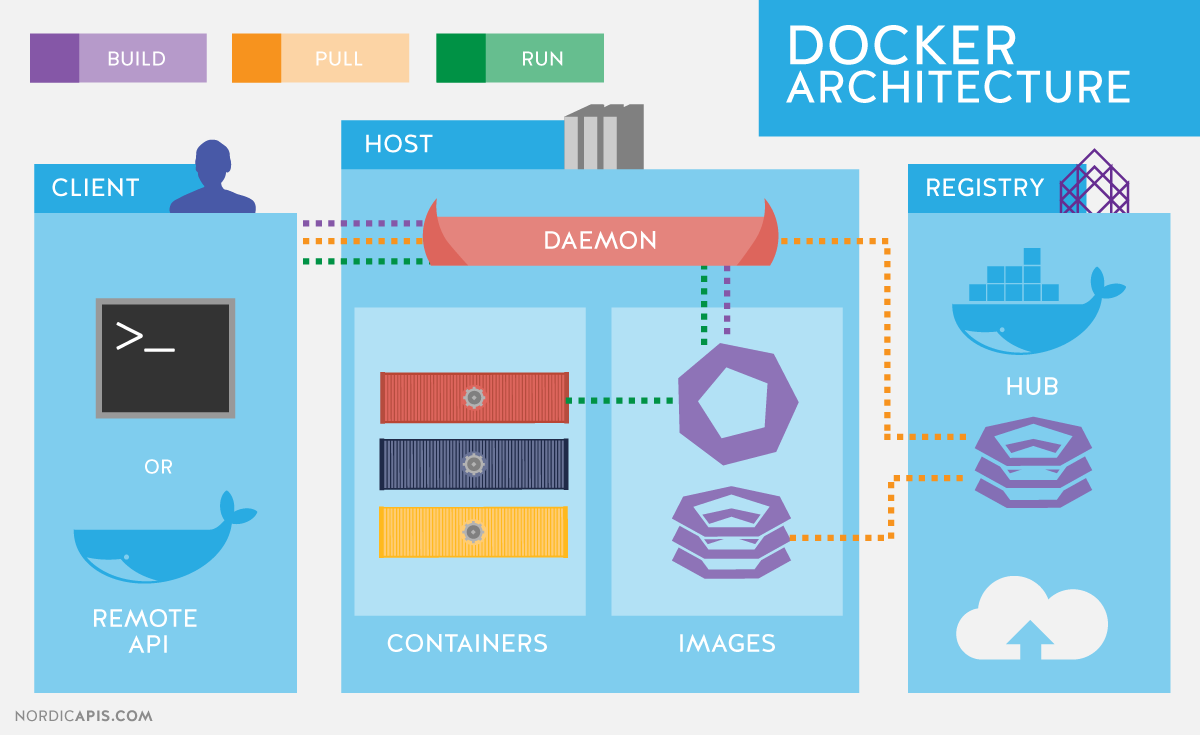
<div><figure><img src="http://19yw4b240vb03ws8qm25h366-wpengine.netdna-ssl.com/wp-content/uploads/Docker-API-infographic-container-devops-nordic-apis.png" alt=""><figcaption></figcaption></figure> <figure><img src="/files/oSDoHCf8K3x7mE6ejRLl" alt=""><figcaption><p>Repurposed from Docker flow diagram</p></figcaption></figure></div>

* **Docker daemon :** จะเป็นส่วนที่คอยติดต่อกับ Docker API และคอยจัดการ Docker Objects เช่น Images, Containers หรือ networks หรืออธิบายง่ายๆ Docker daemon จะเป็นตัวกลางที่ติดต่อกับ daemons อื่นๆ และคอยจัดการ Docker service.&#x20;
* **Docker clients :** ส่วนการทำงานหลักที่จะติดต่อกับ Docker โดยมีผู้ใช้คอยป้อนคำสั่งในการใช้งานและจัดการ Docker หรือใช้การ Remote API ด้วย application ที่รองรับ&#x20;
* **Docker Desktop :** เป็นแอพพลิเคชันที่คอยจัดการ Docker ซึ่งสามารถติดตั้งได้โดยลงบน OS Windows, Linux หรือ MacOS ซึ่งเราการจัดการผ่านแอพพลิเคชันจะเป็นการใช้งานผ่าน [micro service](https://www.borntodev.com/2020/05/22/microservices-%E0%B8%84%E0%B8%B7%E0%B8%AD%E0%B8%AD%E0%B8%B0%E0%B9%84%E0%B8%A3/) ที่ติดต่อผ่าน docker daemon &#x20;
* **Docker registry :** เปรียบเสมือนคลังเก็บของที่เก็บ Docker image ซึ่งสามารถดึงมาใช้งานจาก Docker hub ซึ่งเป็นคลังเก็บ Public registry และถ้าเราต้องการเก็บ image ของเราไว้แบบส่วนตัวสามารถที่จะสร้างและเก็บในรูปแบบ Private registry ได้
* **Docker objects :**&#x20;
  * **Docker File** → คือเอกสารบอกสูตร (การใช้งาน และคำสั่ง) เพื่อสร้าง Docker Image นั้นๆ
  * **Docker Image** → เป็นแบบแปลนที่จะใช้สร้างเป็น Docker Container ท่ีประกอบไปด้วยแอปพลิเคชันต่างๆที่จะทำงานเมื่อมีการเรียกใช้งานที่ Docker Container นั้นๆ รวมทั้งมีการตั้งค่า จำลองสภาพแวดล้อม (Environment) ที่จำเป็นสำหรับการทำงานของมันไว้ด้วย
  * **Docker Container** → เป็นที่บรรจุรวมไว้ทั้งแอปพลิเคชัน, สภาพแวดล้อมที่จำเป็นต่อการทำงาน และองค์ประกอบต่างๆ ที่จำเป็นต่อการทำงานของมัน ซึ่งเราได้สร้างมันมาจาก Docker Image ผ่านการกำหนดโครงสร้างของมันที่ Docker File


---

# Agent Instructions
This documentation is published with GitBook. GitBook is the documentation platform designed so that both humans and AI agents can read, navigate, and reason over technical content effectively. Learn more at gitbook.com.

## Querying This Documentation
If you need additional information that is not directly available in this page, you can query the documentation dynamically by asking a question.

Perform an HTTP GET request on the current page URL with the `ask` query parameter, and the optional `goal` query parameter:

```
GET https://docs.aic-eec.com/general/docker-os/docker-os-part-1.md?ask=<question>&goal=<endgoal>
```

`ask` is the immediate question: it should be specific, self-contained, and written in natural language.
`goal` is optional and describes the broader end goal you are ultimately trying to accomplish on behalf of the user. GitBook uses it to tailor the answer towards what is most useful for that goal.

The response will contain a direct answer to the question and relevant excerpts and sources from the documentation.

Use this mechanism when the answer is not explicitly present in the current page, you need clarification or additional context, or you want to retrieve related documentation sections.