> For the complete documentation index, see [llms.txt](https://docs.aic-eec.com/llms.txt). Markdown versions of documentation pages are available by appending `.md` to page URLs; this page is available as [Markdown](https://docs.aic-eec.com/computer-operation-systems/linux-os-dev.-engineer/process-management/process-basic.md).

# Process Basic

## พื้นฐานของโปรเซส (Process Basic)&#x20;

โปรเซสหมายถึงโปรแกรมที่เรียกให้ทำงานซึ่งจะถูกนำขึ้นอยู่บนหน่วยความจำและพร้อมที่จะถูกประมวลผล ซึ่งหากโปรแกรมยังถูกอยู่ในฮาร์ดดิสก์หรือยังไม่สามารถประมวลผลโดย CPU ได้ โปรแกรมนั้นๆจะยังไม่เป็นโปรเซสแต่จะเป็นเพียงโปรแกรมเท่านั้น การอ้างอิงถึงโปรเซสบนระบบปฏิบัติการต่างๆจะนิยมอ้างอิงโดยใช้เลขประจำตัวโปรเซสเป็นหลัก หรือ Process ID (PID) ซึ่งเลขดังกล่าวนี้ระบบปฏิบัติการจะเป็นผู้กำหนดให้เมื่อมีการรันโปรแกรมขึ้นมา

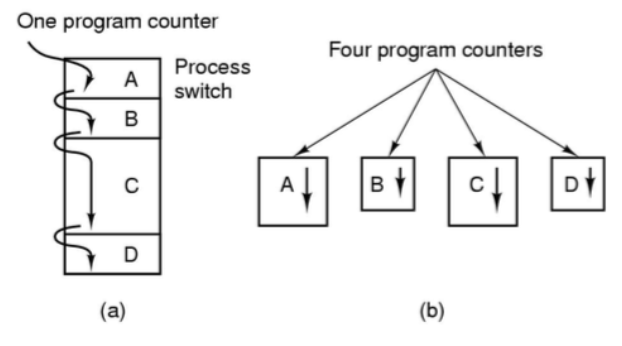
<figure><img src="/files/szWLHHsjba32tkuEf3Dt" alt=""><figcaption><p><em>การทำงานตามลำดับและแบบขนานของโปรเซส</em></p></figcaption></figure>

ระบบปฏิบัติการสามารถที่จะเรียกใช้งานโปรเซสได้หลายรูปแบบอย่างเช่น การให้โปรเซสต่างๆทำงานเป็นแบบลำดับ (Batch) ซึ่งต้องรอให้แต่ละโปรเซสทำงานจนเสร็จสมบูรณ์ก่อนจะไปตัวถัดไปหรือการทำงานแบบพร้อมกัน (multitasking) โดยระบบปฏิบัติการจะสลับให้แต่ละโปรเซสได้มีโอกาสทำงานกันไปจนทยอยกันเสร็จมบูรณ์ แต่อย่างไรก็ตามจะมีเพียงโปรเซสเดียวเท่านั้นที่จะมีสิทธิ์เข้าใช้งาน CPU ณ ช่วงเวลานั้นๆ ดังนั้นระบบปฏิบัติการจะต้องทำการจัดสรรเวลาให้กับโปรเซสต่างๆให้สามารถมีโอกาสเข้าใช้งาน CPU ได้อย่างเท่าเทียมกัน (Time-shared system) หรือตามระดับสิทธิ์ของแต่ละโปรเซส (Priority based)

ระบบโปรเซสในระบบปฏิบัติการ Unix จะมีการจัดลำดับการทำงานของโปรเซส (Scheduling) เพื่อเปลี่ยนงานระหว่างโปรเซสต่างๆในลักษณะ Multilevel Queue Scheduling กล่าวคือแต่ละโปรเซสจะมีเลขลำดับความสำคัญ (priority) ของตัวเอง โดยเลข priority ที่น้อยแปลว่าโปรเซสนั้นมีความสำคัญสูงกว่า และโปรเซสที่มีความสำคัญสูงดังกล่าว ก็จะมีสิทธิได้ใช้เวลาของ CPU (CPU time) มากกว่า&#x20;

### Process Control Block (PCB)

บล็อกควบคุมโปรเซส (Process Control Block : PCB) ระบบปฏิบัติการเอง จะกำหนดเนื้อที่บางส่วนในหน่วยความจำเพื่อทำเป็น PCB ซึ่งเป็นโครงสร้างข้อมูลชนิดหนึ่งซึ่งเก็บข้อมูลที่สำคัญของโปรเซสนั้นๆเอาไว้ข้อมูลเหล่านี้ ได้แก่
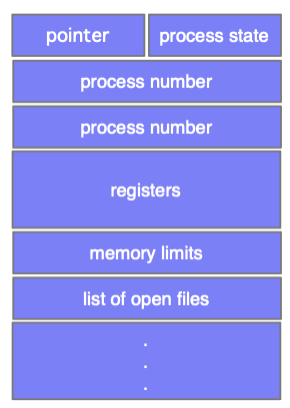
<figure><img src="/files/SPPhD2mmxE8TqdoAJhaF" alt=""><figcaption><p><em>โครงสร้างภายในโปรเซส (PCB)</em></p></figcaption></figure>

1. พอยเตอร์ (Pointer) ใช้ชี้ตำแหน่งของโปรเซสที่อยู่ในหน่วยความจำและตำแหน่งของทรัพยากรที่โปรเซสครอบครองอยู่
2. สถานะของโปรเซส (Process state) แสดงสถานะของโปรเซสที่เป็นอยู่ในปัจจุบัน
3. หมายเลขโปรเซส (Program id) เป็นหมายเลขประจำตัวของโปรเซส
4. ตัวนับจำนวน (Program counter)&#x20;
5. รีจิสเตอร์ (Register) ทำหน้าที่เก็บข้อมูลสถานะระบบเมื่อมีอินเทอร์รัพเกิดขึ้นเพื่อทำให้โปรแกรมสามารถทำงานต่อไปได้เมื่อกลับมาทำงานอีกครั้ง รีจิสเตอร์จะมีค่าและประเภทที่เปลี่ยนแปลงได้ขึ้นอยู่กับสถาปัตยกรรมของคอมพิวเตอร์ ประเภทของรีจิสเตอร์คือ Accumulator, Index, Stack Pointer และรีจิสเตอร์ทั่วไป
6. ข้อมูลการจัดเวลาของซีพียู (CPU scheduling information) เป็นข้อมูลที่ประกอบด้วยลำดับความสำคัญของโปรเซส ที่ถูกกำหนดโดยระบบปฏิบัติการ เมื่อโปรเซสถูกสร้างขึ้นมา สามารถเปลี่ยนค่าไปได้ ซึ่งโปรเซสใดที่มีความสำคัญมากระบบปฏิบัติการจะให้สิทธิมากกว่าโปรเซสอื่น
7. ข้อมูลการจัดการหน่วยความจำ (Memory management information) เป็นข้อมูลเกี่ยวกับหน่วยความจำ ที่ระบบปฏิบัติการกำหนดไว้ เช่นขนาดหน่วยความจำ, ค่าของรีจิสเตอร์, Page table และ Segment table เป็นต้น
8. ข้อมูลแอ็กเคาต์ (Account information) เป็นข้อมูลที่อาจประกอบด้วยจำนวน CPU, เวลาที่กำหนด, หมายเลขแอ็กเคาต์, หมายเลขโปรเซส และอื่นๆ
9. ข้อมูลสถานะอินพุต/เอาต์พุต (I/O status information) เป็นข้อมูลแสดงรายการของอุปกรณ์อินพุต/เอาต์พุตที่โปรเซสนี้ใช้


---

# Agent Instructions
This documentation is published with GitBook. GitBook is the documentation platform designed so that both humans and AI agents can read, navigate, and reason over technical content effectively. Learn more at gitbook.com.

## Querying This Documentation
If you need additional information that is not directly available in this page, you can query the documentation dynamically by asking a question.

Perform an HTTP GET request on the current page URL with the `ask` query parameter, and the optional `goal` query parameter:

```
GET https://docs.aic-eec.com/computer-operation-systems/linux-os-dev.-engineer/process-management/process-basic.md?ask=<question>&goal=<endgoal>
```

`ask` is the immediate question: it should be specific, self-contained, and written in natural language.
`goal` is optional and describes the broader end goal you are ultimately trying to accomplish on behalf of the user. GitBook uses it to tailor the answer towards what is most useful for that goal.

The response will contain a direct answer to the question and relevant excerpts and sources from the documentation.

Use this mechanism when the answer is not explicitly present in the current page, you need clarification or additional context, or you want to retrieve related documentation sections.
