# Process State

เมื่อมีผู้ใช้งานสั่งให้โปรเซสเริ่มทำงาน ระบบปฏิบัติการจะทำการสร้างโปรเซสแล้วส่งเข้าไปสู่ Ready Queue เพื่อรอเข้าประมวลผลภายใน CPU และเมื่อหมดเวลาในการประมวลผล (สำหรับ Preemptive Scheduling) หรือเมื่อโปรเซสต้องรอการทำงานของ I/O ระบบจะเลือกโปรเซสจากสถานะ Ready Queue ตัวถัดไปเข้ามาประมวลผลใน CPU ทั้งนี้การเลือกจะดูที่เลข Priority และลำดับความสำคัญอื่นๆประกอบกัน จะวนเวียนเช่นนี้ไปเรื่อยๆจนกระทั่งโปรเซสทำงานเสร็จและออกจากระบบไป
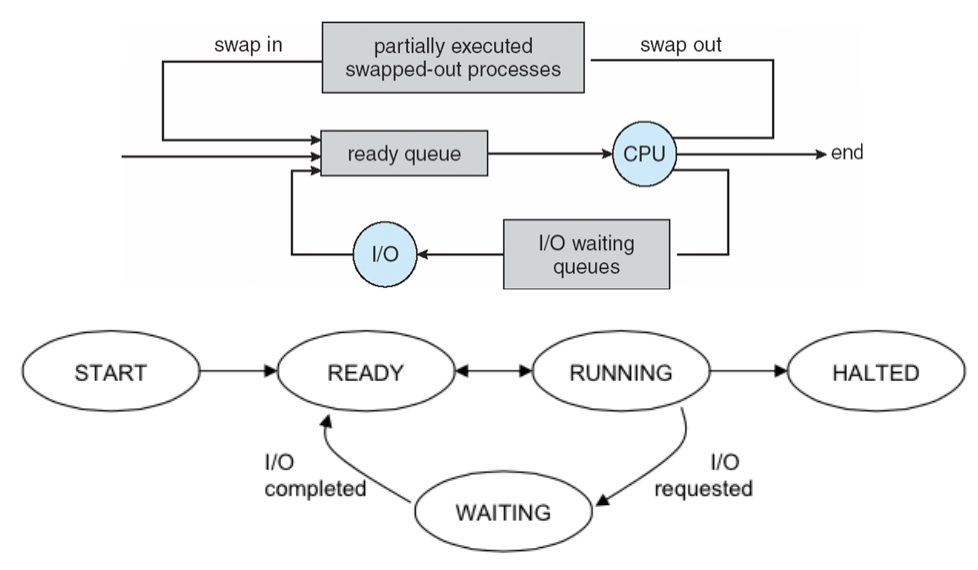
<figure><img src="/files/aJAqeA72DFECoWBeSABq" alt=""><figcaption><p><em>สถานะการทำงานของโปรเซส</em></p></figcaption></figure>

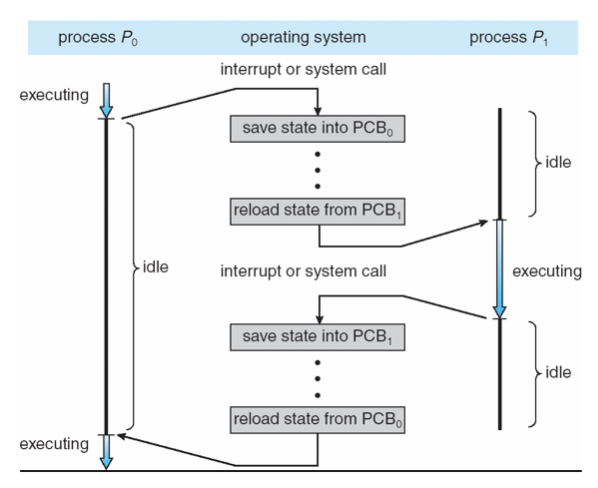
ซึ่งเมื่อโปรเซสหนึ่งต้องหยุดการทำงานและออกมาจากการครอบครอง CPU ก็จะต้องทำการเก็บสถานะล่าสุดทั้งหมดเข้าไปใน PCB ของตัวเอง เพื่อรอคิวครั้งใหม่ ที่จะถูกเรียกจากตัวจัดลำดับของระบบปฏิบัติการ (scheduler) ต่อไป ซึ่งการสลับโปรเซสจะเรียกว่า Context Switch ดังรูปแสดงการสลับการทำงานระหว่างโปรเซสข้างล่าง

<figure><img src="/files/WaYRQ6jh7rCDgEg4Mzrn" alt=""><figcaption><p><em>การสลับการทำงานระหว่างโปรเซส</em></p></figcaption></figure>


---

# Agent Instructions: Querying This Documentation

If you need additional information that is not directly available in this page, you can query the documentation dynamically by asking a question.

Perform an HTTP GET request on the current page URL with the `ask` query parameter:

```
GET https://docs.aic-eec.com/computer-operation-systems/linux-os-dev.-engineer/process-management/process-state.md?ask=<question>
```

The question should be specific, self-contained, and written in natural language.
The response will contain a direct answer to the question and relevant excerpts and sources from the documentation.

Use this mechanism when the answer is not explicitly present in the current page, you need clarification or additional context, or you want to retrieve related documentation sections.
