> For the complete documentation index, see [llms.txt](https://docs.aic-eec.com/llms.txt). Markdown versions of documentation pages are available by appending `.md` to page URLs; this page is available as [Markdown](https://docs.aic-eec.com/iot-development-with-infineon-psoc-tm-6-and-bdh-platform/bdh-iot-connectivity/api.md).

# API

<figure><img src="https://1856353139-files.gitbook.io/~/files/v0/b/gitbook-x-prod.appspot.com/o/spaces%2F-MClo3nC-1US0rbK8Qau%2Fuploads%2FLNKdd4XXJwMAUqUsTxAm%2Fimage.png?alt=media&amp;token=e470b240-606c-4f06-9b97-c4db1e5c6f73" alt=""><figcaption><p>Ref: <a href="https://www.geeksforgeeks.org/what-is-an-api/">https://www.geeksforgeeks.org/what-is-an-api/</a></p></figcaption></figure>

## พื้นฐานการเชื่อมต่อด้วย API

**API**

ในปัจจุบันมีผลิตภัณฑ์และบริการจำนวนมากที่มีการใช้งานอุปกรณ์ IoT เป็นองค์ประกอบ และในการเชื่อมต่อระหว่างอุปกรณ์และระบบแอพพลิเคชัน รูปแบบที่ได้รับความนิยมอย่างมากคือการใช้ API (Application Programming Interface) ที่จะทำให้อุปกรณ์ต่างๆ สามารถสื่อสารและแลกเปลี่ยนข้อมูลกันได้อย่างมีประสิทธิภาพ ตลอดจนสามารถเชื่อมต่อข้ามระบบได้ หากมีการทำ API ไว้ให้เรียกใช้โดย API คือชุดของคำสั่งและฟังก์ชันที่ให้บริการแก่โปรแกรมต่างๆ เพื่อให้สามารถสื่อสารกันได้ โดยจะทำหน้าที่เป็นตัวกลางระหว่างผู้ใช้ (Client) และเซิร์ฟเวอร์ (Server) โดยใช้รูปแบบการทำงานแบบร้องขอ (Request) และตอบกลับ (Response)

<figure><img src="https://1856353139-files.gitbook.io/~/files/v0/b/gitbook-x-prod.appspot.com/o/spaces%2F-MClo3nC-1US0rbK8Qau%2Fuploads%2FgfPAeMelJGPGi4z3yk85%2Fimage.png?alt=media&amp;token=2e0c5b04-3a34-4487-bd6f-6bad44a39cc9" alt=""><figcaption><p>การทำงานของ API</p></figcaption></figure>

**ข้อดีของการใช้ API**

ข้อดีของการใช้ API ในการเชื่อมต่อระหว่างอุปกรณ์และระบบมีหลายอย่าง เช่นการใช้ API สามารถเชื่อมได้หลายอุปกรณ์ มีความรวดเร็ว สามารถขยายได้หากในอนาคตมีความต้องการในการใช้งานมากขึ้นและสามารถจำกัดการใช้งานได้ มีความปลอดภัยสูง

**ตัวอย่างการใช้งานของ API**

ตัวอย่างการใช้งานของ API เช่นการเชื่อมต่ออุปกรณ์ IoT กับระบบแอพพลิเคชันบนคลาวด์ ทำให้สามารถส่งข้อมูลที่อ่านได้จากเซนเซอร์ไปประมวลผลและแสดงผลบนแอพพลิเคชันได้ การควบคุมอุปกรณ์ไฟฟ้าผ่านทางโทรศัพท์ การเก็บข้อมูลสุขภาพของคนไข้และแสดงให้บุคลากรทางการแพทย์เพื่อประกอบการรักษา การส่งข้อมูลที่อ่านค่าระดับน้ำมาแสดงผลบนหน้า Dashboard เป็นต้น

**การใช้งาน API**

การเรียก API เป็นกระบวนการที่โปรแกรมทำการร้องขอ (Request) ข้อมูลจาก API และ API ทำการตอบสนอง (Responses) ข้อมูลกลับมาตามคำร้องขอโดยข้อมูลที่ส่งกลับมาจะอยู่ในรูปแบบ JSON หรือ XML โดนกระทำในรูปแบบของ HTTP (Hypertext Transfer Protocol) เป็นโปรโตคอลที่ใช้สำหรับการส่งข้อมูลระหว่างผู้ใช้ (Client) และเซิร์ฟเวอร์ (Server) โดยมีการใช้วิธีการ (methods) ต่างๆ ได้แก่

* GET: ดึงข้อมูลจากเซิร์ฟเวอร์ (อ่านข้อมูล)
* POST: ส่งข้อมูลไปยังเซิร์ฟเวอร์ (สร้างข้อมูลใหม่)
* PUT: อัปเดตข้อมูลที่มีอยู่แล้วบนเซิร์ฟเวอร์
* DELETE: ลบข้อมูลบนเซิร์ฟเวอร์

## 🔥 Requirements

<table><thead><tr><th width="429">Resources</th><th>Links</th></tr></thead><tbody><tr><td>Computer</td><td>💻</td></tr><tr><td>Nodejs Version 20 or later</td><td><a href="https://nodejs.org/en">Link</a></td></tr></tbody></table>

## BDH IoT Data Service API Development

* **Express.js** เป็นแพ็คเกจ Nodejs ที่ช่วยให้สามารถสร้าง API ได้ง่ายและรวดเร็ว ได้รับความนิยมสูง โดย Express.js มีโครงสร้างที่ง่ายและไม่ซับซ้อน มีความสามารถในการจัดการ Path และกำหนด Path สำหรับทำ HTTP Request ได้
* **Swagger** เป็นเครื่องมือในการสร้างเอกสารสำหรับใช้งาน API (API Documents) ที่จะช่วยให้สามารถทดลองเรียกใช้งาน API ใน path ต่างๆ ได้ผ่าน Web browser ได้โดยตรง

## **ขั้นตอนการ** สร้าง API ด้วย Express.js

1\. เปิด vscode และสร้าง folder ใช้ชื่อว่า **api-server-workshop**

2\. เปิด folder ด้วยโปรแกรม vsCode และทำการสร้าง nodejs project ผ่าน termial โดยใช้คำสั่ง

```
npm init -y
```

3. จะได้ไฟล์ชื่อว่า Package.json ใน folder
4. ทำการติดตั้ง Package สำหรับใช้งาน

```
npm install express swagger-jsdoc swagger-ui-express --save
```

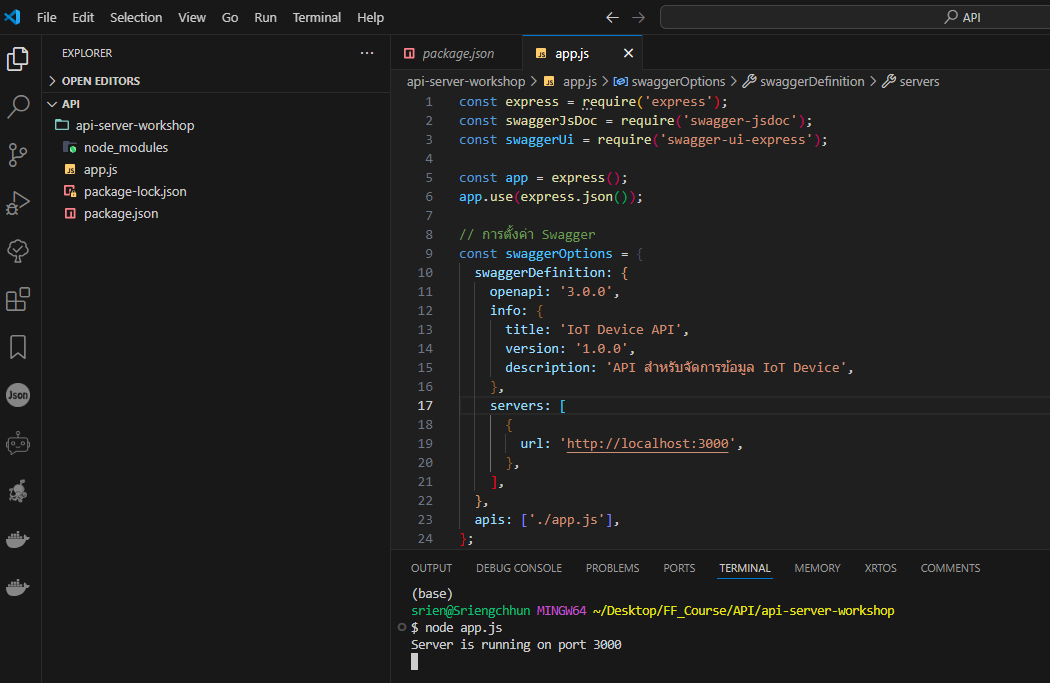
5. สร้างไฟล์ app.js และ และเพิ่ม Code ด้างล่าง

<figure><img src="https://1856353139-files.gitbook.io/~/files/v0/b/gitbook-x-prod.appspot.com/o/spaces%2F-MClo3nC-1US0rbK8Qau%2Fuploads%2FElad3z7IYtdoVtdY1oEM%2Fimage.png?alt=media&amp;token=3d562c6e-bbca-4afe-b176-a9332b609b03" alt=""><figcaption></figcaption></figure>

```applescript
const express = require('express');
const swaggerJsDoc = require('swagger-jsdoc');
const swaggerUi = require('swagger-ui-express');

const app = express();
app.use(express.json());

// การตั้งค่า Swagger
const swaggerOptions = {
  swaggerDefinition: {
    openapi: '3.0.0',
    info: {
      title: 'IoT Device API',
      version: '1.0.0',
      description: 'API สำหรับจัดการข้อมูล IoT Device',
    },
    servers: [
      {
        url: 'http://localhost:3000',
      },
    ],
  },
  apis: ['./app.js'],
};

const swaggerDocs = swaggerJsDoc(swaggerOptions);
app.use('/docs', swaggerUi.serve, swaggerUi.setup(swaggerDocs));

// ข้อมูลตัวอย่างสำหรับ IoT Device
let devices = [
  { id: 1, name: 'Temperature Sensor', type: 'sensor', status: 'active' },
  { id: 2, name: 'Humidity Sensor', type: 'sensor', status: 'inactive' },
];

/**
 * @swagger
 * /devices:
 *   get:
 *     summary: รับข้อมูล IoT Devices ทั้งหมด
 *     responses:
 *       200:
 *         description: สำเร็จ
 *         content:
 *           application/json:
 *             schema:
 *               type: array
 *               items:
 *                 type: object
 *                 properties:
 *                   id:
 *                     type: integer
 *                   name:
 *                     type: string
 *                   type:
 *                     type: string
 *                   status:
 *                     type: string
 */
app.get('/devices', (req, res) => {
  res.json(devices);
});

/**
 * @swagger
 * /devices/{id}:
 *   get:
 *     summary: รับข้อมูล IoT Device โดยใช้ ID
 *     parameters:
 *       - in: path
 *         name: id
 *         required: true
 *         schema:
 *           type: integer
 *         description: ID ของ IoT Device
 *     responses:
 *       200:
 *         description: สำเร็จ
 *         content:
 *           application/json:
 *             schema:
 *               type: object
 *               properties:
 *                 id:
 *                   type: integer
 *                 name:
 *                   type: string
 *                 type:
 *                   type: string
 *                 status:
 *                   type: string
 *       404:
 *         description: ไม่พบอุปกรณ์
 */
app.get('/devices/:id', (req, res) => {
  const device = devices.find((d) => d.id === parseInt(req.params.id));
  if (!device) return res.status(404).send('ไม่พบอุปกรณ์');
  res.json(device);
});

/**
 * @swagger
 * /devices:
 *   post:
 *     summary: เพิ่ม IoT Device ใหม่
 *     requestBody:
 *       required: true
 *       content:
 *         application/json:
 *           schema:
 *             type: object
 *             properties:
 *               name:
 *                 type: string
 *               type:
 *                 type: string
 *               status:
 *                 type: string
 *     responses:
 *       201:
 *         description: สร้างอุปกรณ์ใหม่สำเร็จ
 */
app.post('/devices', (req, res) => {
  const newDevice = {
    id: devices.length + 1,
    name: req.body.name,
    type: req.body.type,
    status: req.body.status,
  };
  devices.push(newDevice);
  res.status(201).json(newDevice);
});

/**
 * @swagger
 * /devices/{id}:
 *   put:
 *     summary: แก้ไขข้อมูล IoT Device โดยใช้ ID
 *     parameters:
 *       - in: path
 *         name: id
 *         required: true
 *         schema:
 *           type: integer
 *         description: ID ของ IoT Device
 *     requestBody:
 *       required: true
 *       content:
 *         application/json:
 *           schema:
 *             type: object
 *             properties:
 *               name:
 *                 type: string
 *               type:
 *                 type: string
 *               status:
 *                 type: string
 *     responses:
 *       200:
 *         description: แก้ไขข้อมูลสำเร็จ
 *       404:
 *         description: ไม่พบอุปกรณ์
 */
app.put('/devices/:id', (req, res) => {
  const device = devices.find((d) => d.id === parseInt(req.params.id));
  if (!device) return res.status(404).send('ไม่พบอุปกรณ์');

  device.name = req.body.name;
  device.type = req.body.type;
  device.status = req.body.status;

  res.json(device);
});

/**
 * @swagger
 * /devices/{id}:
 *   delete:
 *     summary: ลบ IoT Device โดยใช้ ID
 *     parameters:
 *       - in: path
 *         name: id
 *         required: true
 *         schema:
 *           type: integer
 *         description: ID ของ IoT Device
 *     responses:
 *       200:
 *         description: ลบอุปกรณ์สำเร็จ
 *       404:
 *         description: ไม่พบอุปกรณ์
 */
app.delete('/devices/:id', (req, res) => {
  const deviceIndex = devices.findIndex((d) => d.id === parseInt(req.params.id));
  if (deviceIndex === -1) return res.status(404).send('ไม่พบอุปกรณ์');

  devices.splice(deviceIndex, 1);
  res.send('ลบอุปกรณ์สำเร็จ');
});

// เริ่มเซิร์ฟเวอร์
const PORT = process.env.PORT || 3000;
app.listen(PORT, () => console.log(`Server is running on port ${PORT}`));
```

6. Run Code ด้วยคำสั่งใน termianl

```
node app.js
```

<figure><img src="https://1856353139-files.gitbook.io/~/files/v0/b/gitbook-x-prod.appspot.com/o/spaces%2F-MClo3nC-1US0rbK8Qau%2Fuploads%2FzdITJVMR0iweo7RTFP8H%2Fimage.png?alt=media&amp;token=21844ea8-15bb-40e1-849f-3c9c93bc9d09" alt=""><figcaption><p>การ Run Code</p></figcaption></figure>

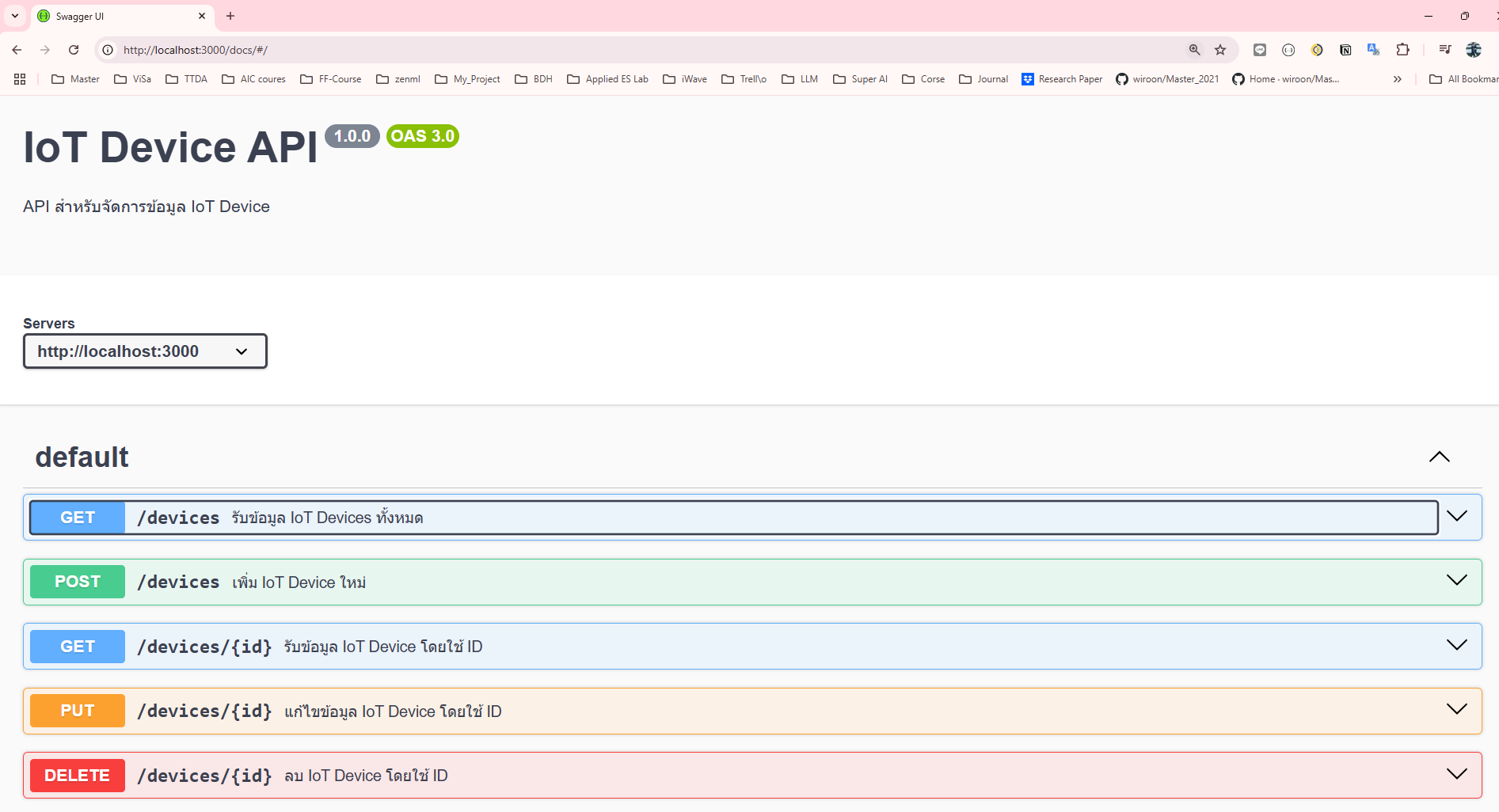
7. เปิด Web Browser ที่ <http://localhost:3000/docs> จะได้หน้า API Docs

<figure><img src="https://1856353139-files.gitbook.io/~/files/v0/b/gitbook-x-prod.appspot.com/o/spaces%2F-MClo3nC-1US0rbK8Qau%2Fuploads%2FPVERMFlTPCwffF7nWJa7%2Fimage.png?alt=media&amp;token=f2a9cb21-0dc7-46bd-a1ea-a0a1fc5f1e67" alt=""><figcaption><p>หน้า API Doc</p></figcaption></figure>