# Reading XENSIV-DPS-3XX Pressure Sensor and Displaying GUI on Serial Studio

## L*ab Objective:*

&#x20;   In this lab, participants will leverage the Infineon PSoC 6 microcontroller to interface with the XENSIV-DPS-3XX pressure sensor. Data from the sensor will be acquired and processed to determine atmospheric pressure readings. These readings will then be visualized and analyzed using Serial Studio's graphical user interface (GUI), providing real-time insights into ambient pressure conditions and facilitating an understanding of sensor operations and data interpretation.

## 🔥 Requirements

<table><thead><tr><th width="429">Resources</th><th>Links</th></tr></thead><tbody><tr><td>Computer</td><td>💻</td></tr><tr><td>ModusToolbox™ software v3.0 or later</td><td><a href="https://www.infineon.com/modustoolbox">Link</a></td></tr><tr><td>CY8CKIT-062S2-43012 Infineon Board</td><td><a href="https://github.com/Advance-Innovation-Centre-AIC/BIIL_MTB-100_Hello_World_and_LED_Blinking_Programming_Template/assets/88732241/0215501d-b774-4045-8e64-ef49e28d8404">Link</a></td></tr><tr><td>Technical Report</td><td><a href="https://www.dropbox.com/scl/fi/amaxc94pte0ut2i1r5ewx/Technical-Report-Lab00.paper?rlkey=b3xm3vrerz9xgv1glb30cvy9z&#x26;dl=0">dropbox</a></td></tr></tbody></table>

## 🚩 Let start

### Create Application

<figure><img src="https://1856353139-files.gitbook.io/~/files/v0/b/gitbook-x-prod.appspot.com/o/spaces%2F-MClo3nC-1US0rbK8Qau%2Fuploads%2F2sT43HbeC49vaO9mEqSk%2Fimage.png?alt=media&#x26;token=e6276ddf-a96d-4f25-8e8e-036568933c80" alt=""><figcaption><p>Create Application</p></figcaption></figure>

### Coding

* Config code for Serial Studio
  * Open main.c&#x20;
  * Add the below code into `for(;;)` loop function

{% code title="main.c" %}

```c
// For Serial Studio
printf("/*%.2f,%.2f,%.2f*/\r\n",pressure_hPa, pressure_mbar, temperature);
```

{% endcode %}

<figure><img src="https://1856353139-files.gitbook.io/~/files/v0/b/gitbook-x-prod.appspot.com/o/spaces%2F-MClo3nC-1US0rbK8Qau%2Fuploads%2FR6FFYW6vW9S02av4a8gY%2Fimage.png?alt=media&#x26;token=f658a92c-e716-472e-b1f1-dea794511fe8" alt=""><figcaption><p>Config code for Serial Studio</p></figcaption></figure>

* Save the file
* Build and Launch the Application

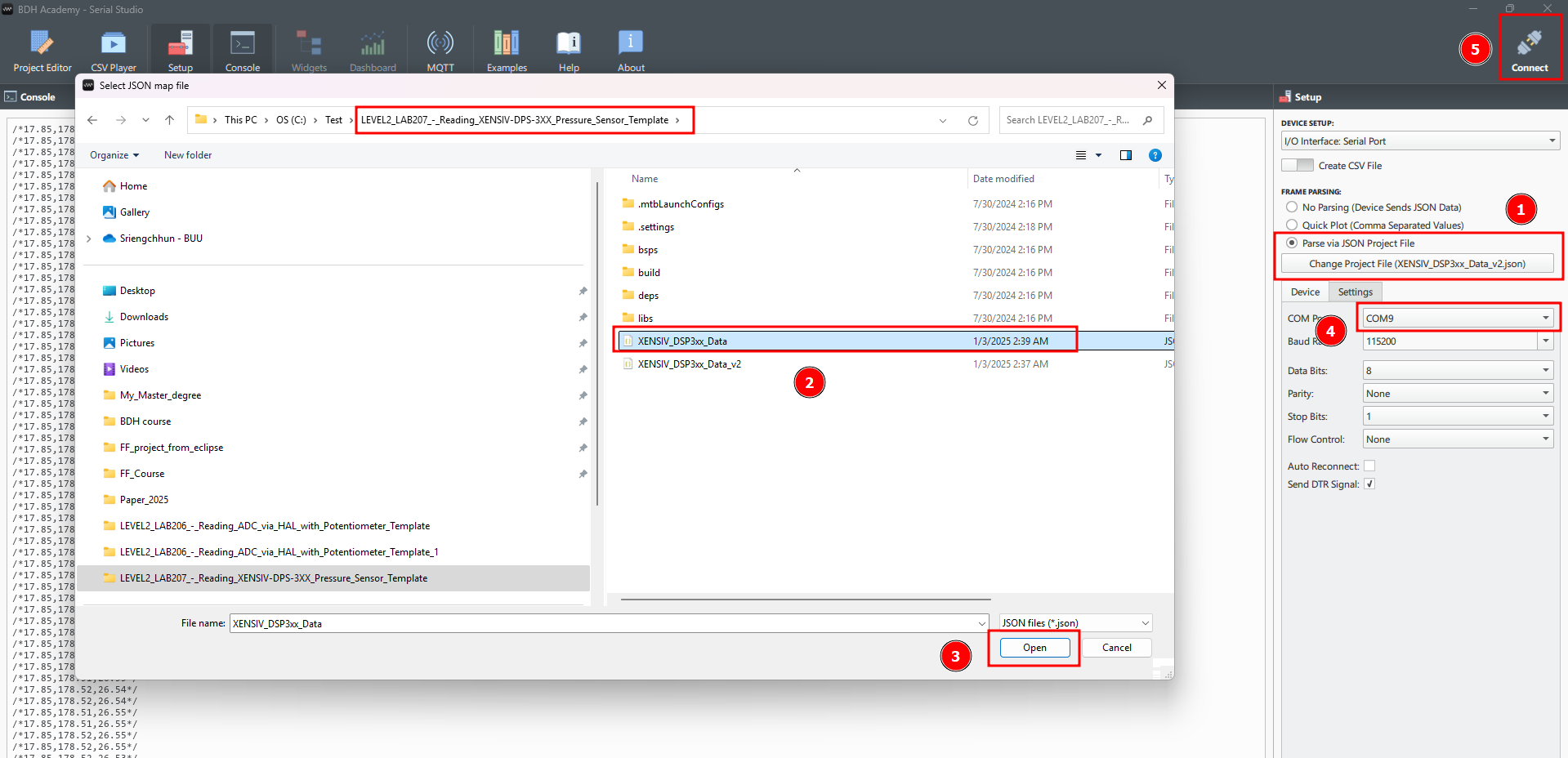
### Set up Serial studio for the board:&#x20;

* Open Serial Studio.&#x20;
* Navigate to the "Setup" section.&#x20;
* Locate the JSON file within your project's workspace and select it.&#x20;
* Select the appropriate port from the available options.&#x20;
* Click on "Connect" to establish a connection and start viewing the sensor data.

<figure><img src="https://1856353139-files.gitbook.io/~/files/v0/b/gitbook-x-prod.appspot.com/o/spaces%2F-MClo3nC-1US0rbK8Qau%2Fuploads%2FdqS1QF74tfpWIac2nmxH%2Fimage.png?alt=media&#x26;token=2af2f557-3757-4255-85dd-a9024d98414a" alt=""><figcaption><p>Add file.jso</p></figcaption></figure>

### Result&#x20;

<figure><img src="https://1856353139-files.gitbook.io/~/files/v0/b/gitbook-x-prod.appspot.com/o/spaces%2F-MClo3nC-1US0rbK8Qau%2Fuploads%2FFuh2tiP6vqMUlP2h05hX%2Fimage.png?alt=media&#x26;token=6c6c6178-97df-43e4-bb2c-4c63ca15aed6" alt=""><figcaption></figcaption></figure>

> #### 🎉 <mark style="color:blue;">Congratulations! You can now complete this lab</mark>

## Supported toolchains (make variable 'TOOLCHAIN')

* GNU Arm® embedded compiler v10.3.1 (`GCC_ARM`) - Default value of `TOOLCHAIN`
* Arm® compiler v6.16 (`ARM`)
* IAR C/C++ compiler v9.30.1 (`IAR`)

## Supported kits (make variable 'TARGET')

* [PSoC™ 62S2 Wi-Fi Bluetooth® pioneer kit](https://www.infineon.com/CY8CKIT-062S2-43012) (`CY8CKIT-062S2-43012`)
* [PSoC™ 62S1 Wi-Fi Bluetooth® pioneer kit](https://www.infineon.com/CYW9P62S1-43438EVB-01) (`CYW9P62S1-43438EVB-01`)
* [PSoC™ 62S1 Wi-Fi Bluetooth® pioneer kit](https://www.infineon.com/CYW9P62S1-43012EVB-01) (`CYW9P62S1-43012EVB-01`)
* [PSoC™ 62S3 Wi-Fi Bluetooth® prototyping kit](https://www.infineon.com/CY8CPROTO-062S3-4343W) (`CY8CPROTO-062S3-4343W`)

## Related resources

| Resources                       | Links                                                                                                                                                      |
| ------------------------------- | ---------------------------------------------------------------------------------------------------------------------------------------------------------- |
| ModusToolbox™ Software Training | [link](https://www.dropbox.com/sh/waj898o4o8eccx0/AAB3hBBaIQo2OvJ5-fubGJIha/training-modustoolbox-level1-getting-started-master/Manual/Ch2-Tools.pdf?dl=0) |

## Other resources

Infineon provides a wealth of data at [www.infineon.com](http://www.infineon.com) to help you select the right device, and quickly and effectively integrate it into your design.

## Document history

Document title: LEVEL2-Lab208: Motion Sensors GUI Integration via Serial Studio Template<br>

<table><thead><tr><th width="149">Version</th><th>Description of change</th></tr></thead><tbody><tr><td>1.0.0</td><td>LEVEL2-Lab208: Learn Motion Sensors GUI Integration via Serial Studio Template</td></tr></tbody></table>

## Authors:

* *Assoc. Prof. Wiroon Sriborrirux*
* *Mr. Sriengchhun Chheang*
* *Mr. Sabol Socare*<br>

<br>

***

© BDH Corporation, 2022-2023