# Infineon PSoC™ Troubleshooting

## *Adding the BDH Code Template*

* Open modus-shell

<figure><img src="https://1856353139-files.gitbook.io/~/files/v0/b/gitbook-x-prod.appspot.com/o/spaces%2F-MClo3nC-1US0rbK8Qau%2Fuploads%2FlObbwC6k3pTNrOsZFfeK%2Fimage.png?alt=media&#x26;token=8c6a2c4b-90b6-4c13-bd09-2f2fde229ffb" alt=""><figcaption><p>modus-shell</p></figcaption></figure>

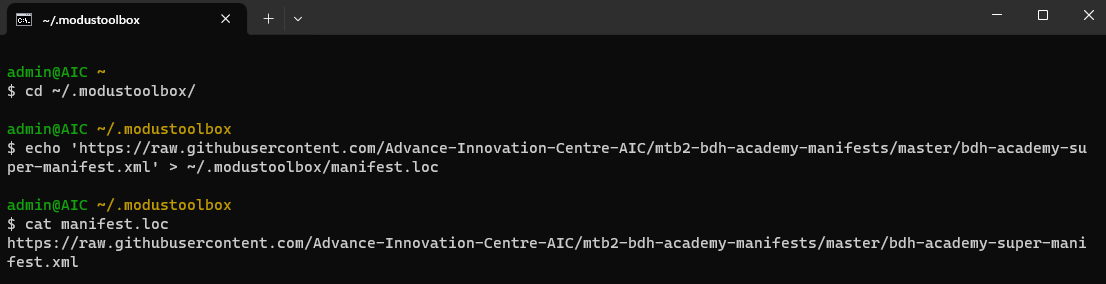
* Navigate to directory ModusToolbox and Adding the BDH code Template:

```
cd ~/.modustoolbox/
```

```
echo 'https://raw.githubusercontent.com/Advance-Innovation-Centre-AIC/mtb2-bdh-academy-manifests/master/bdh-academy-basic-app-super-manifest.xml' > ~/.modustoolbox/manifest.loc
```

<figure><img src="https://1856353139-files.gitbook.io/~/files/v0/b/gitbook-x-prod.appspot.com/o/spaces%2F-MClo3nC-1US0rbK8Qau%2Fuploads%2FWmTU7W6arLSiCUKRxbx5%2Fimage.png?alt=media&#x26;token=e065d39d-5e52-4cc1-ada5-99e034848f18" alt=""><figcaption></figcaption></figure>

***

## *Update Firmware*

### **🖥️ For Windows**

* Open modus-shell

<figure><img src="https://1856353139-files.gitbook.io/~/files/v0/b/gitbook-x-prod.appspot.com/o/spaces%2F-MClo3nC-1US0rbK8Qau%2Fuploads%2FhxIAumeXxyJ2O2mdOEcj%2Fimage.png?alt=media&#x26;token=23999d10-f18e-4d23-84c7-0e80a21cef7f" alt=""><figcaption></figcaption></figure>

> <mark style="color:orange;">ให้สังเกตชื่อไดเรกทอรี tools\_3.1 จะต้องให้ตรงกับ version ของ modusToolbox เช่น version 3.1</mark>&#x20;

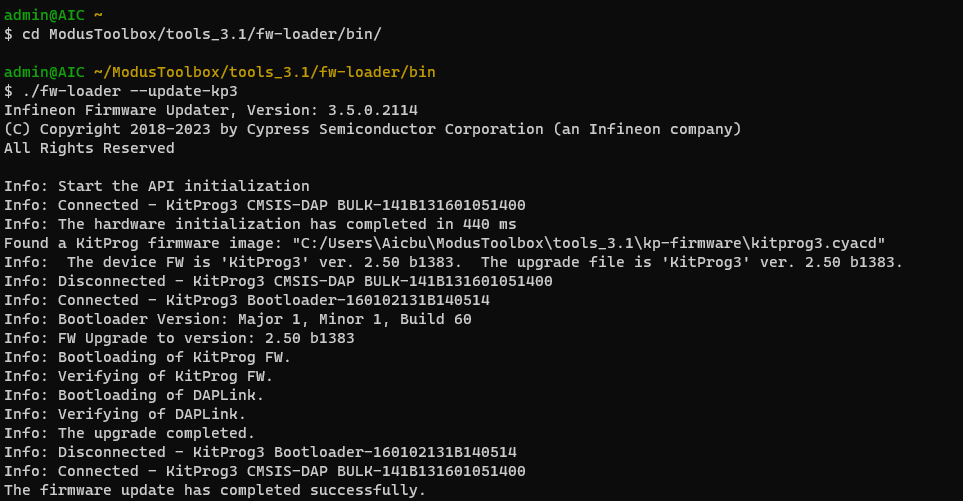
* Navigate to directory ModusToolbox/tools\_3.1/fw-loader/bin/

```
$ cd ModusToolbox/tools_3.1/fw-loader/bin/
$ ./fw-loader --update-kp3
```

<figure><img src="https://1856353139-files.gitbook.io/~/files/v0/b/gitbook-x-prod.appspot.com/o/spaces%2F-MClo3nC-1US0rbK8Qau%2Fuploads%2FaJ4c8sJtk1c6fPBlIn62%2Fimage.png?alt=media&#x26;token=06142ffb-d726-4f3a-a245-6ad0218d38ec" alt="" width="563"><figcaption><p>./fw-loader --update-kp3</p></figcaption></figure>

### **🖥️ For Mac**

* Checking fw’s version

<mark style="color:orange;">ให้สังเกตชื่อไดเรกทอรี tools\_3.1 จะต้องให้ตรงกับ version ของ modusToolbox เช่น version 3.2</mark>

```sh
$ cd /Applications/ModusToolbox/tools_3.2/fw-loader/bin/
$ ./fw-loader --device-list
```

```sh
Infineon Firmware Updater, Version: 3.6.0.2303
(C) Copyright 2018-2024 by Cypress Semiconductor Corporation (an Infineon company)
All Rights Reserved

Info: Start the API initialization
Info: Connected - KitProg3 DAPLink CMSIS-DAP-190B1301f808151401f8081500000000000000002e127069
Info: The hardware initialization has completed in 290 ms
The connected supported devices:
	1: KitProg3 DAPLink CMSIS-DAP-190B1301f808151401f8081500000000000000002e127069	FW Version 2.50.1383 [outdated]
Warning: The firmware on the KitProg3 DAPLink CMSIS-DAP-190B1301f808151401f8081500000000000000002e127069 device(s) is outdated. Use --update-kp3 [full-device-name|serial-num|all] to update.
```

ในกรณีที่มีข้อความเตือนว่า "<mark style="color:red;">is outdated</mark>" ให้ทำการอัพเดท firmware ดังรายละเอียดข้างล่างนี้

* Update firmware

```sh
$ ./fw-loader --update-kp3
```

```sh
Infineon Firmware Updater, Version: 3.6.0.2303
(C) Copyright 2018-2024 by Cypress Semiconductor Corporation (an Infineon company)
All Rights Reserved

Info: Start the API initialization
Info: Connected - KitProg3 DAPLink CMSIS-DAP-190B1301f808151401f8081500000000000000002e127069
Info: The hardware initialization has completed in 286 ms
Found a KitProg firmware image: "/Applications/ModusToolbox/tools_3.2/kp-firmware/kitprog3.cyacd"
Info:  The device FW is 'KitProg3' ver. 2.50 b1383.  The upgrade file is 'KitProg3' ver. 2.50 b1401.
Info: Disconnected - KitProg3 DAPLink CMSIS-DAP-190B1301f808151401f8081500000000000000002e127069
Info: Connected - KitProg3 Bootloader-F801020815140714
Info: Bootloader Version: Major 1, Minor 1, Build 60
Info: FW Upgrade to version: 2.50 b1401
Info: Bootloading of KitProg FW.
Info: Verifying of KitProg FW.
Info: Bootloading of DAPLink.
Info: Verifying of DAPLink.
Info: The upgrade completed.
Info: Disconnected - KitProg3 Bootloader-F801020815140714
Info: Connected - KitProg3 DAPLink CMSIS-DAP-190B1301f808151401f8081500000000000000002e127069
The firmware update has completed successfully.
```

> ในกรณีที่โหมดการเขียนโปรแกรมยังเป็น "<mark style="color:red;">`KitProg3 DAPLink CMSIS-DAP`</mark>" ให้เปลี่ยนโหมดการเขียนโปรแกรมให้เป็น "<mark style="color:green;">`KitProg3 CMSIS-DAP BULK`</mark>" ดังคำสั่งนี้

```sh
./fw-loader --mode kp3-bulk      
                                                                                                             ─╯
Infineon Firmware Updater, Version: 3.6.0.2303
(C) Copyright 2018-2024 by Cypress Semiconductor Corporation (an Infineon company)
All Rights Reserved

Info: Start the API initialization
Info: Connected - KitProg3 DAPLink CMSIS-DAP-190B1301f808151401f8081500000000000000002e127069
Info: The hardware initialization has completed in 292 ms
Info: Disconnected - KitProg3 DAPLink CMSIS-DAP-190B1301f808151401f8081500000000000000002e127069
Info: Connected - KitProg3 CMSIS-DAP BULK-141508F801071400
The mode switching completed successfully.
```

***

## *<mark style="background-color:blue;">Bug #001 : Switching mode DAPLink to KitProg3 or KitProg3 to DAPLink mo</mark>*<mark style="background-color:blue;">de</mark>&#x20;

### Bug issue

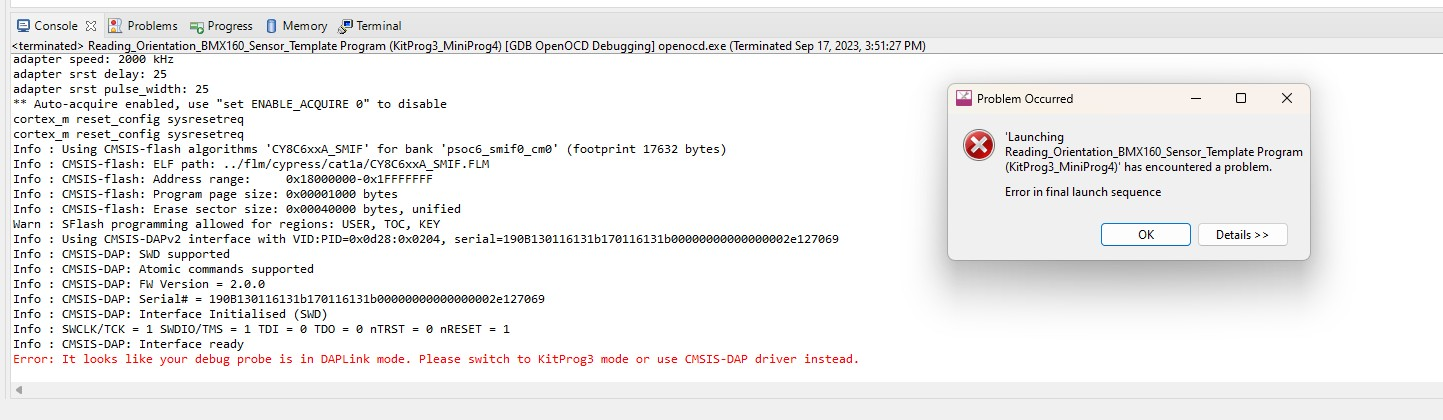
{% hint style="info" %} <mark style="color:red;">Error: It looks like your debug probe is in DAPLink mode. Please switch to KitProg3 mode or use CMSIS-DAP driver instead.</mark>
{% endhint %}

<figure><img src="https://1856353139-files.gitbook.io/~/files/v0/b/gitbook-x-prod.appspot.com/o/spaces%2F-MClo3nC-1US0rbK8Qau%2Fuploads%2Fg6eAWGuwg5S71AP487O5%2Fimage.png?alt=media&#x26;token=09c0831a-15a7-4f7e-8435-257eedc8f891" alt=""><figcaption><p>Error alert when launching the Application</p></figcaption></figure>

### How to Fix

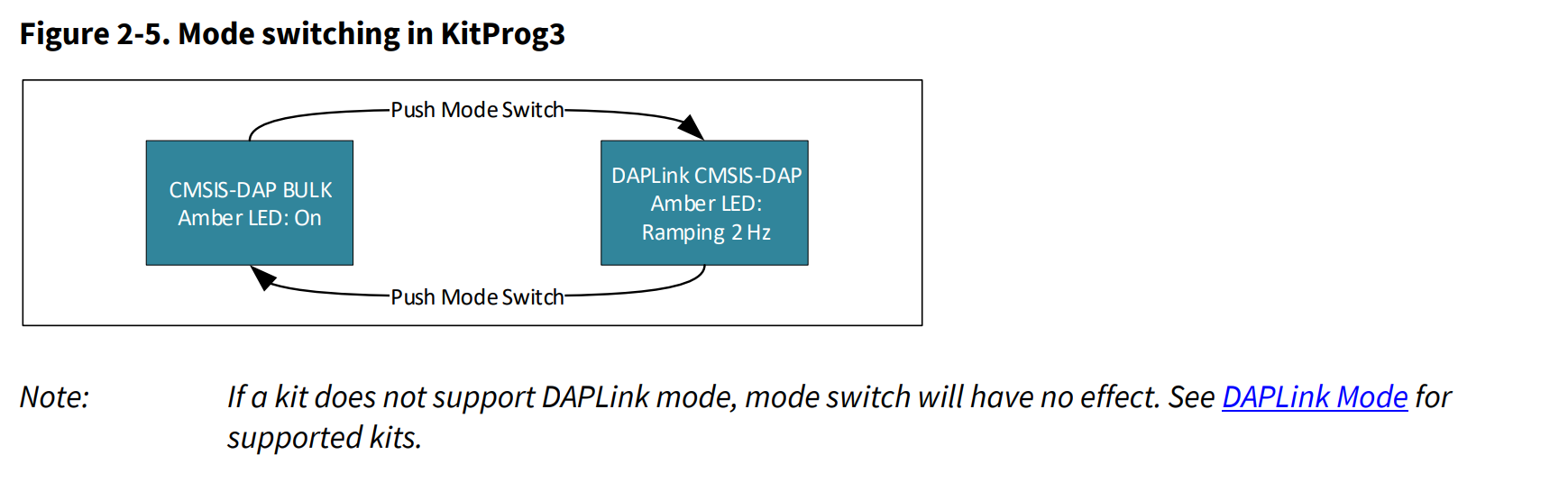
<figure><img src="https://1856353139-files.gitbook.io/~/files/v0/b/gitbook-x-prod.appspot.com/o/spaces%2F-MClo3nC-1US0rbK8Qau%2Fuploads%2FiyiFh1D1gZzBJ6ghjOFd%2Fimage.png?alt=media&#x26;token=f5b7f8b2-0254-48bf-98b4-3754fa33850c" alt=""><figcaption><p><a href="https://www.infineon.com/dgdl/Infineon-KitProg3_User_Guide-UserManual-v17_00-EN.pdf?fileId=8ac78c8c7d0d8da4017d0f01221f1853">Mode Switching</a></p></figcaption></figure>

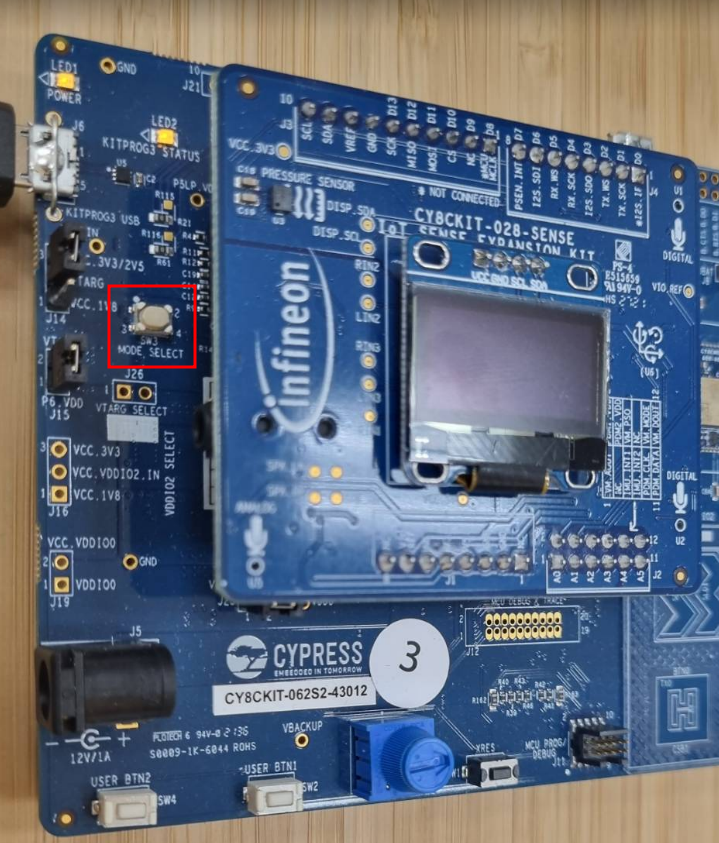
<figure><img src="https://1856353139-files.gitbook.io/~/files/v0/b/gitbook-x-prod.appspot.com/o/spaces%2F-MClo3nC-1US0rbK8Qau%2Fuploads%2FXbOpzA47x94JsxONiN0b%2Fimage.png?alt=media&#x26;token=20f3d389-5f30-477d-b75d-b72e200deb70" alt="" width="360"><figcaption><p>Button for Switching mode</p></figcaption></figure>

{% hint style="info" %} <mark style="color:red;">In case pressing the switch button doesn't yield any response, you may need to first update the firmware. Follow the steps below:</mark>
{% endhint %}

1. Open the Modus shell.
2. Navigate to the necessary directory by entering the following command:

```shell-session
$ cd ModusToolbox/tools_3.1/fw-loader/bin/
```

3. Update the firmware by executing the command:

```shell-session
$ ./fw-loader --update-kp3
```

4. After updating the firmware, verify the available devices with the command:

```shell-session
$ ./fw-loader --device-list
```

Once the firmware is updated, you should be able to use the switch mode button successfully.

***

## *<mark style="background-color:purple;">Bug #002 : "Error: IMU init failed (0x0000)!" message</mark>*

### Bug issues&#x20;

<figure><img src="https://1856353139-files.gitbook.io/~/files/v0/b/gitbook-x-prod.appspot.com/o/spaces%2F-MClo3nC-1US0rbK8Qau%2Fuploads%2FBstdmsmycj3AKTeUIEVB%2FmessageImage_1694957551821.jpg?alt=media&#x26;token=52332001-93ad-423a-9c3a-4da44f8c1890" alt=""><figcaption></figcaption></figure>

### How to Fix

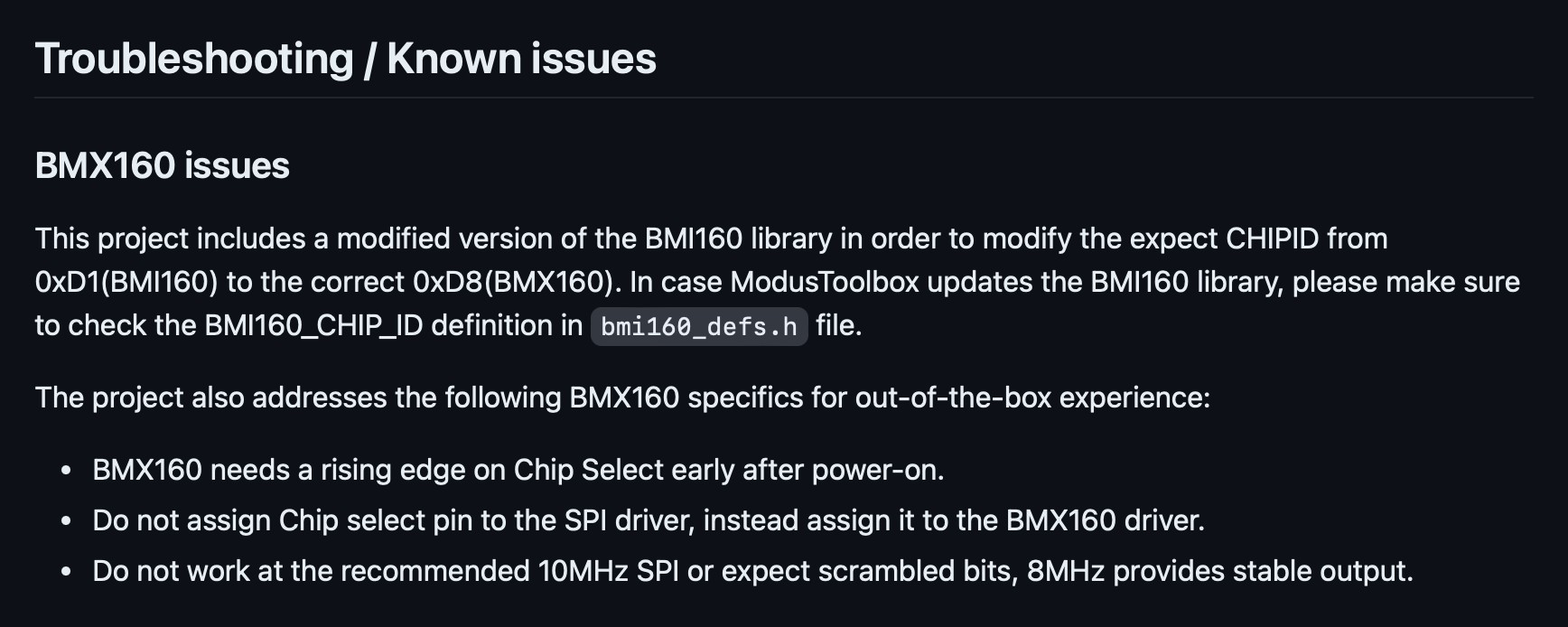
Find <mark style="color:red;">**mtb\_shared**</mark> folder in your project and change the <mark style="color:red;">**BMI160\_CHIP\_IP**</mark>&#x20;

<figure><img src="https://1856353139-files.gitbook.io/~/files/v0/b/gitbook-x-prod.appspot.com/o/spaces%2F-MClo3nC-1US0rbK8Qau%2Fuploads%2FEfn2OwElqoXwUMFCOHgN%2Fimage.png?alt=media&#x26;token=470896cf-5119-4828-a14f-6280ad684352" alt=""><figcaption><p>bmi160_defs.h</p></figcaption></figure>

***

## Firmware update&#x20;

* Update firmware:

```
$  cd ~/ModusToolbox/tools_3.1/fw-loader/bin
$  ./fw-loader --update-kp3
$  ./fw-loader --device-list
```

***

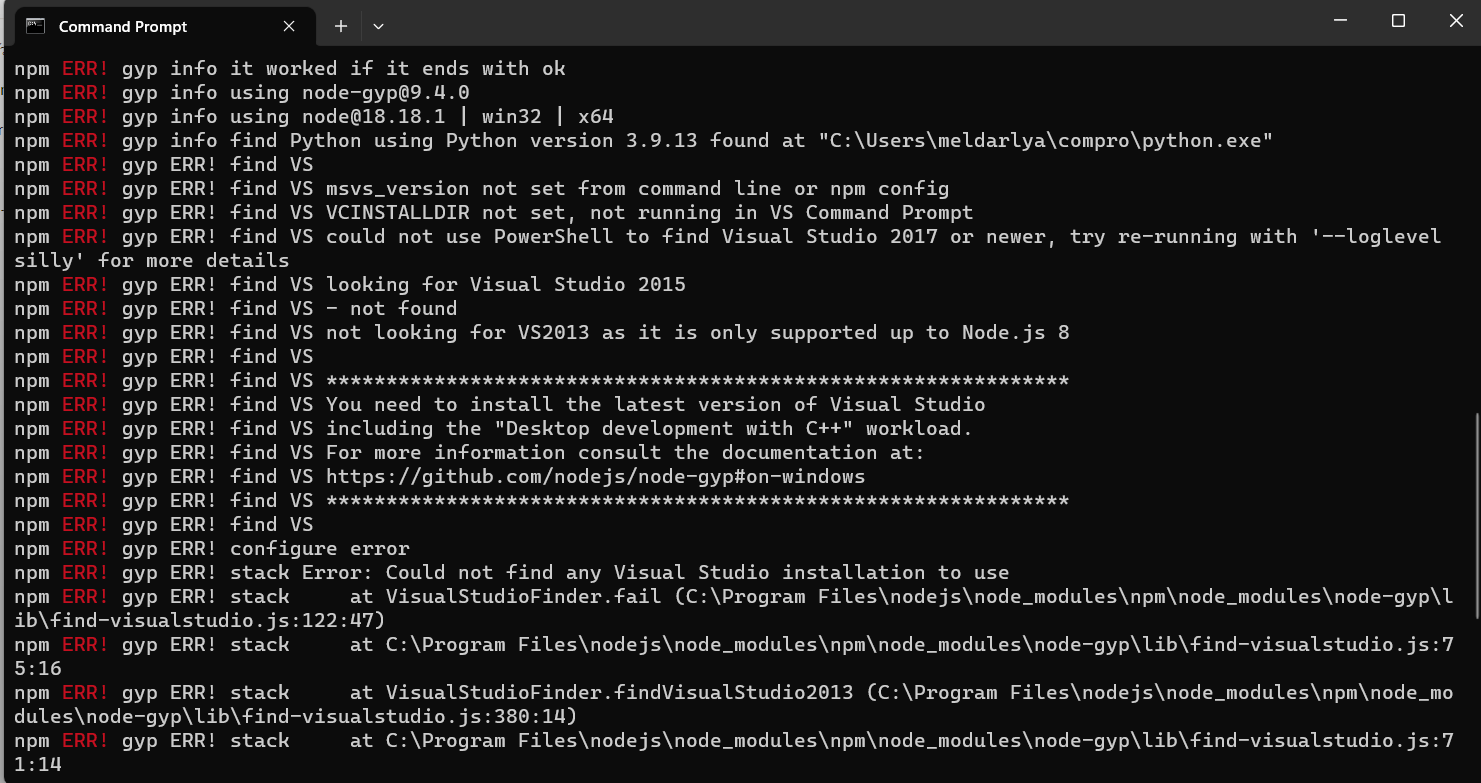
## *Bug#003 Can't install edge-impulse-cli*

<figure><img src="https://1856353139-files.gitbook.io/~/files/v0/b/gitbook-x-prod.appspot.com/o/spaces%2F-MClo3nC-1US0rbK8Qau%2Fuploads%2FBEXMFcwQT6dDIvgkeyAc%2Fimage.png?alt=media&#x26;token=74e3648e-04b2-4e96-886e-bc5e8863436e" alt=""><figcaption><p>Visual Studio installer error.</p></figcaption></figure>

### How to fix:

#### 1. Install Visual Studio Installer

* [Visual Studio Installer link](https://visualstudio.microsoft.com/thank-you-downloading-visual-studio/?sku=Community\&channel=Release\&version=VS2022\&source=VSLandingPage\&cid=2030\&passive=false)

<figure><img src="https://1856353139-files.gitbook.io/~/files/v0/b/gitbook-x-prod.appspot.com/o/spaces%2F-MClo3nC-1US0rbK8Qau%2Fuploads%2F8q0XMTbiR2aH0YQ0Advf%2Fimage.png?alt=media&#x26;token=03ad48e4-ca14-41de-9333-defd55f5927c" alt=""><figcaption><p>Installation</p></figcaption></figure>

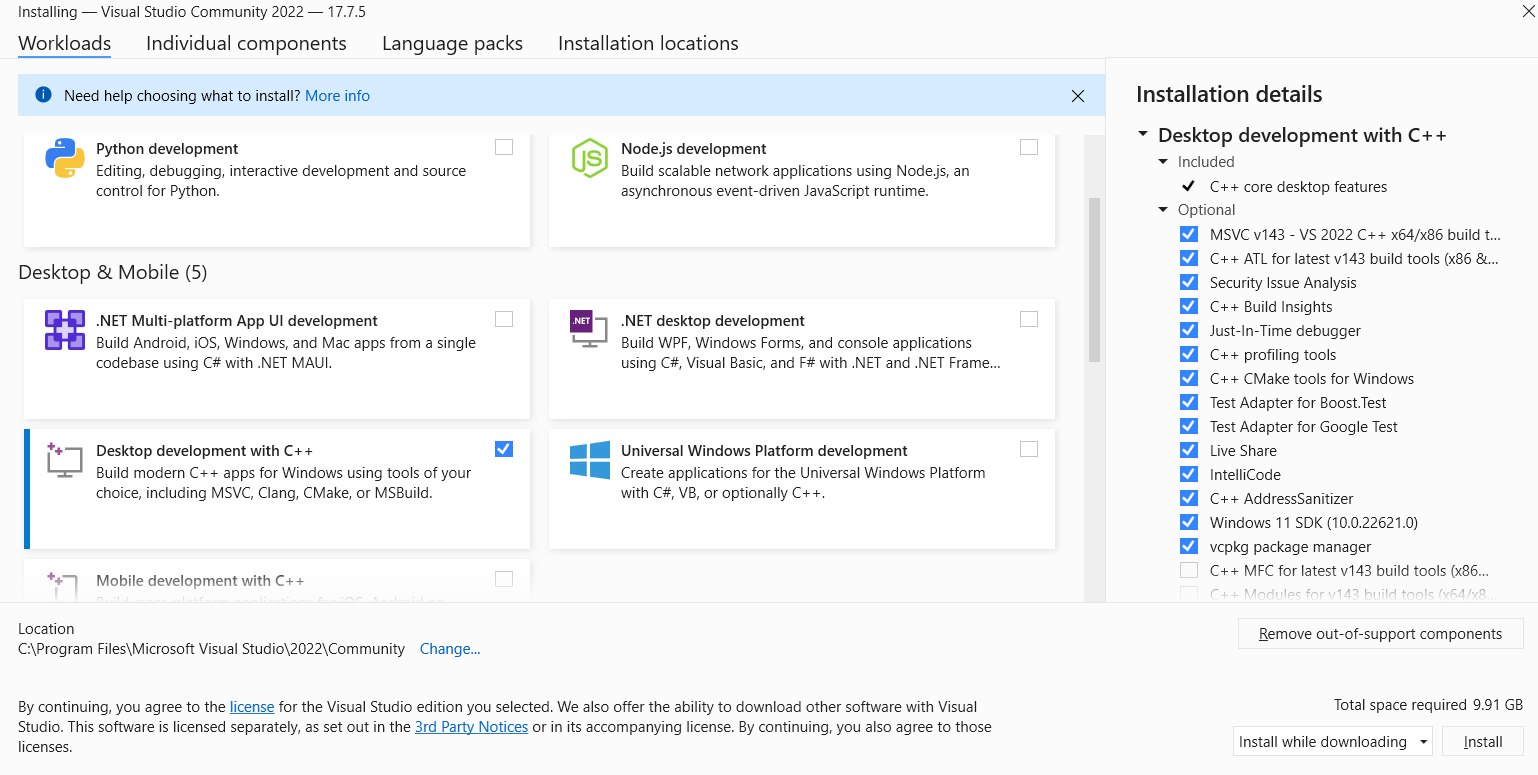
<figure><img src="https://1856353139-files.gitbook.io/~/files/v0/b/gitbook-x-prod.appspot.com/o/spaces%2F-MClo3nC-1US0rbK8Qau%2Fuploads%2FDx7kdw7FxECPEP5l0nxb%2Fimage.png?alt=media&#x26;token=77e405c2-b6cc-410d-98a1-30041bb3fda1" alt=""><figcaption><p>Open and select "<strong>Desktop development with C++</strong>" then install</p></figcaption></figure>

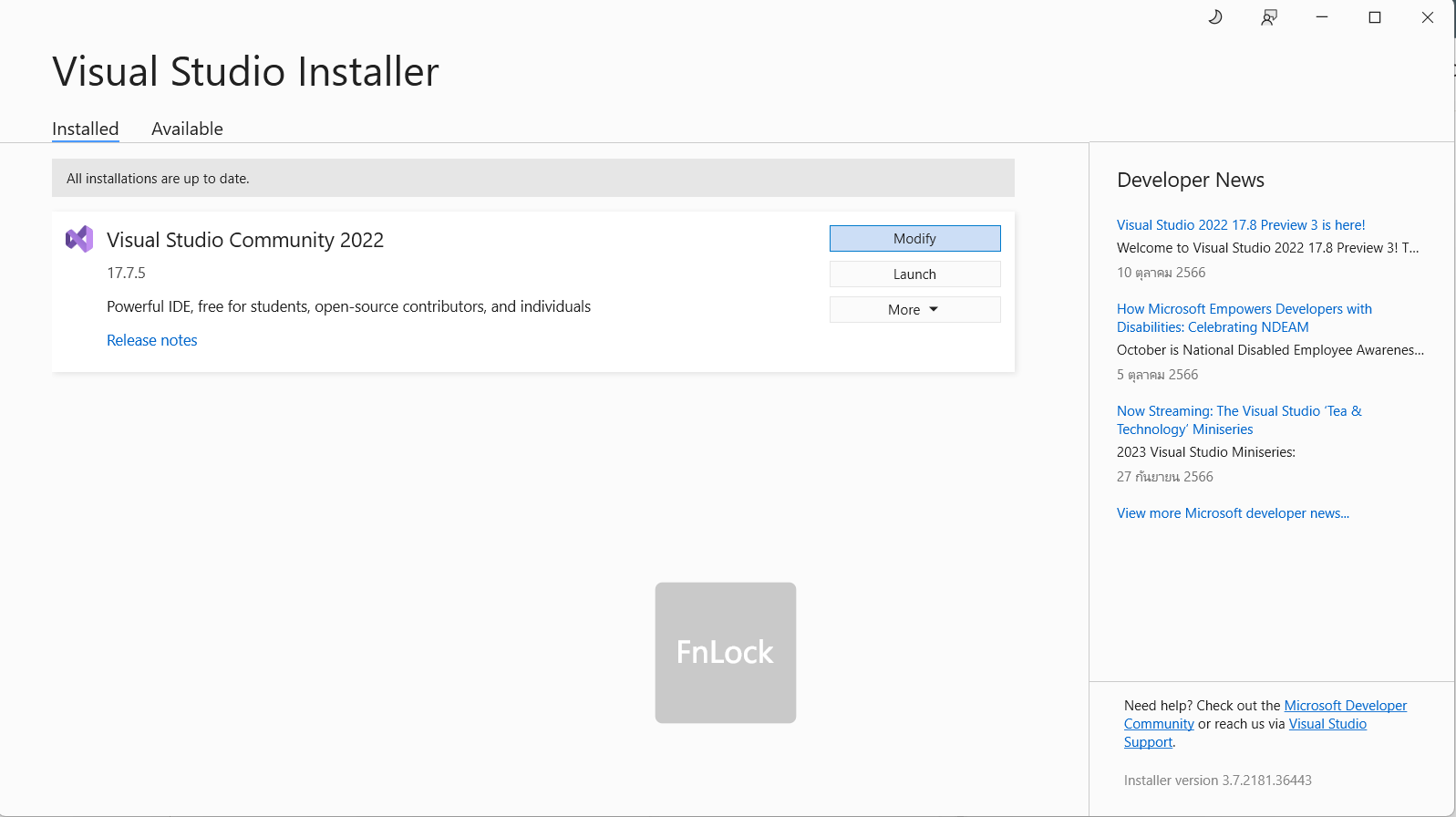
<figure><img src="https://1856353139-files.gitbook.io/~/files/v0/b/gitbook-x-prod.appspot.com/o/spaces%2F-MClo3nC-1US0rbK8Qau%2Fuploads%2FGYXHQBGqvI8ZfU3SRFL4%2Fimage.png?alt=media&#x26;token=a3da73b6-af9c-4971-a67c-e8e934666403" alt=""><figcaption><p>Install complect</p></figcaption></figure>

{% hint style="info" %}
Important: You need to use python3.11.x
{% endhint %}

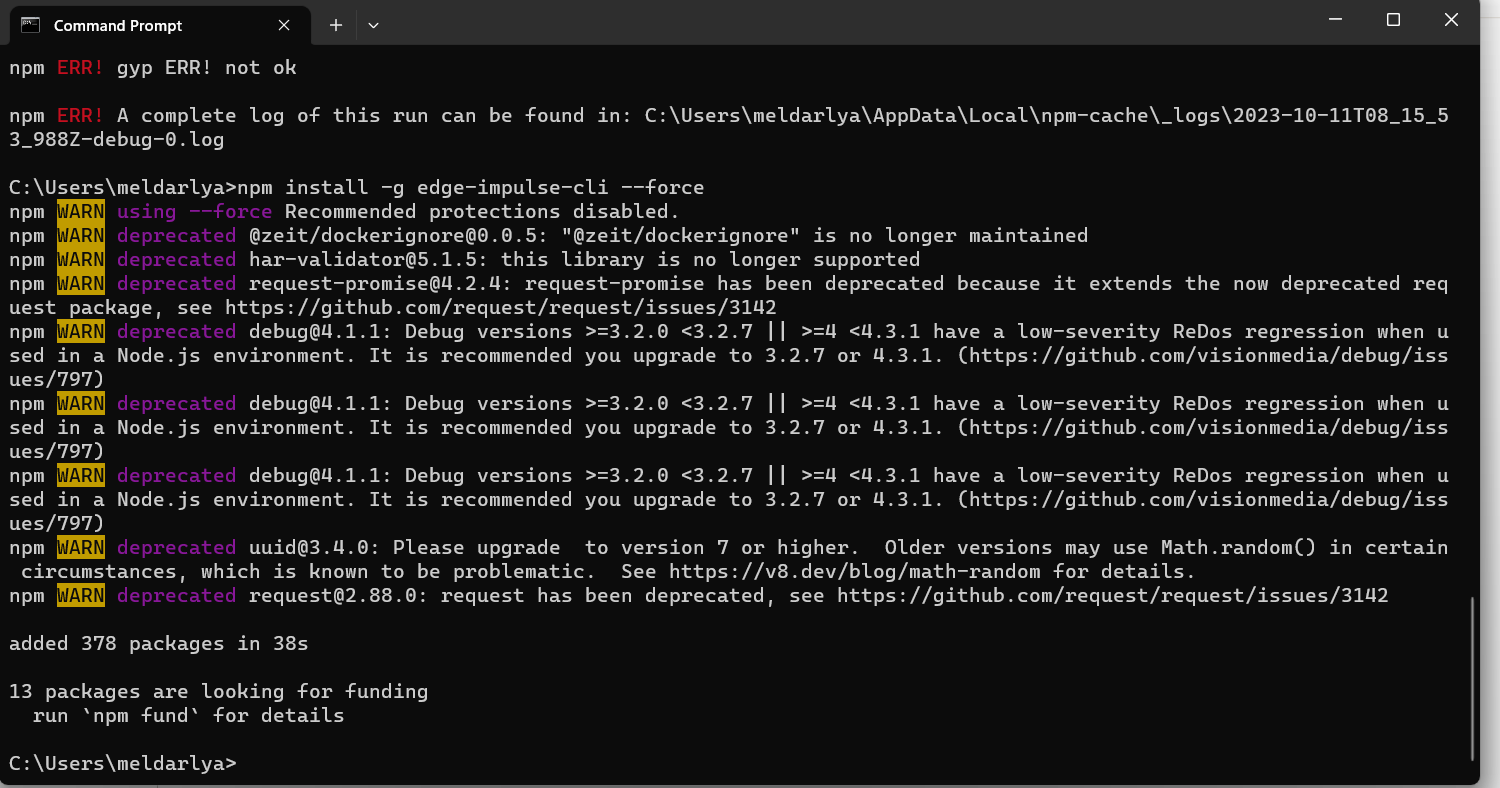
Install edge-impulse-cli again:

```
npm install -g edge-impulse-cli --force
```

<figure><img src="https://1856353139-files.gitbook.io/~/files/v0/b/gitbook-x-prod.appspot.com/o/spaces%2F-MClo3nC-1US0rbK8Qau%2Fuploads%2FCHgvKgdWfbsG25csPU6z%2Fimage.png?alt=media&#x26;token=6aa81ace-93aa-4fba-adda-cb48857ccf7e" alt=""><figcaption><p>Sucessfully install the edge-impulse-cli</p></figcaption></figure>