# GPIO Button Interrupt via HAL

## L*ab Objective:*

&#x20;   In this lab, participants will configure the Infineon PSoC 6 microcontroller to detect button presses using GPIO interrupts via the Hardware Abstraction Layer (HAL). Rather than continuously polling the button's state, the microcontroller will be set up to respond immediately upon a button press through an interrupt mechanism. This hands-on experience aims to educate participants on the efficient use of hardware interrupts, showcasing how HAL can facilitate real-time responsiveness and optimize system performance by minimizing unnecessary CPU cycles.

## 🔥 Requirements

<table><thead><tr><th width="429">Resources</th><th>Links</th></tr></thead><tbody><tr><td>Computer</td><td>💻</td></tr><tr><td>ModusToolbox™ software v3.0 or later</td><td><a href="https://www.infineon.com/modustoolbox">Link</a></td></tr><tr><td>CY8CKIT-062S2-43012 Infineon Board</td><td><a href="https://github.com/Advance-Innovation-Centre-AIC/BIIL_MTB-100_Hello_World_and_LED_Blinking_Programming_Template/assets/88732241/0215501d-b774-4045-8e64-ef49e28d8404">Link</a></td></tr><tr><td>Technical Report</td><td><a href="https://www.dropbox.com/scl/fi/amaxc94pte0ut2i1r5ewx/Technical-Report-Lab00.paper?rlkey=b3xm3vrerz9xgv1glb30cvy9z&#x26;dl=0">dropbox</a></td></tr></tbody></table>

## 🚩 Let start

### Create Application

<figure><img src="https://1856353139-files.gitbook.io/~/files/v0/b/gitbook-x-prod.appspot.com/o/spaces%2F-MClo3nC-1US0rbK8Qau%2Fuploads%2FtMk1M7jq1w9Y9Vk6sTcU%2Fimage.png?alt=media&#x26;token=0c62df3f-3df7-47c6-a78a-14aaa37db151" alt=""><figcaption><p>Create Application</p></figcaption></figure>

### Coding

* Coding: Open the main.c file and add the following code to the main(void) function.

{% code title="main.c" %}

```c
#include "cy_pdl.h"
#include "cyhal.h"
#include "cybsp.h"
#include "cy_retarget_io.h"

#define GPIO_INTERRUPT_PRIORITY (7u)

//Interrupt handler
static void button_isr(void *handler_arg, cyhal_gpio_event_t event)
{
	cyhal_gpio_toggle(CYBSP_USER_LED);
}

// GPIO callback initialization structure
cyhal_gpio_callback_data_t cb_data =
{
	.callback     = button_isr,
	.callback_arg = NULL
};

int main(void)
{
    cy_rslt_t result;

    /* Initialize the device and board peripherals */
    result = cybsp_init() ;
    /*BSP init failed. Stop program execution */
    if (result != CY_RSLT_SUCCESS)
    {
        CY_ASSERT(0);
    }

    /* Initialize the User LED */
    result = cyhal_gpio_init(CYBSP_USER_LED, CYHAL_GPIO_DIR_OUTPUT, CYHAL_GPIO_DRIVE_STRONG, CYBSP_LED_STATE_OFF);
	/* GPIO init failed. Stop program execution */
	if (result != CY_RSLT_SUCCESS)
	{
		CY_ASSERT(0);
	}

	/* Initialize the user button */
	result = cyhal_gpio_init(CYBSP_USER_BTN, CYHAL_GPIO_DIR_INPUT, CYHAL_GPIO_DRIVE_PULLUP, CYBSP_BTN_OFF);
	/* GPIO init failed. Stop program execution */
	if (result != CY_RSLT_SUCCESS)
	{
		CY_ASSERT(0);
	}

	/* Configure GPIO interrupt */
	cyhal_gpio_register_callback(CYBSP_USER_BTN, &cb_data);
	cyhal_gpio_enable_event(CYBSP_USER_BTN, CYHAL_GPIO_IRQ_FALL, GPIO_INTERRUPT_PRIORITY, true);


	/* Enable global interrupts */
    __enable_irq();


    for (;;)
    {
    	/* Enter deep sleep mode */
		cyhal_syspm_deepsleep();


    }
}
```

{% endcode %}

### Build the Application

### Launching the Application

> Note: Before launching the program to the board, make sure that you have already connected the board to the computer through a USB cable.

<figure><img src="https://github.com/Advance-Innovation-Centre-AIC/BIIL_MTB-100_Hello_World_and_LED_Blinking_Programming_Template/assets/88732241/7a6bb6ef-cb63-4613-98a1-42f9617ad724" alt="" width="188"><figcaption><p>set up USB cable</p></figcaption></figure>

### Result&#x20;

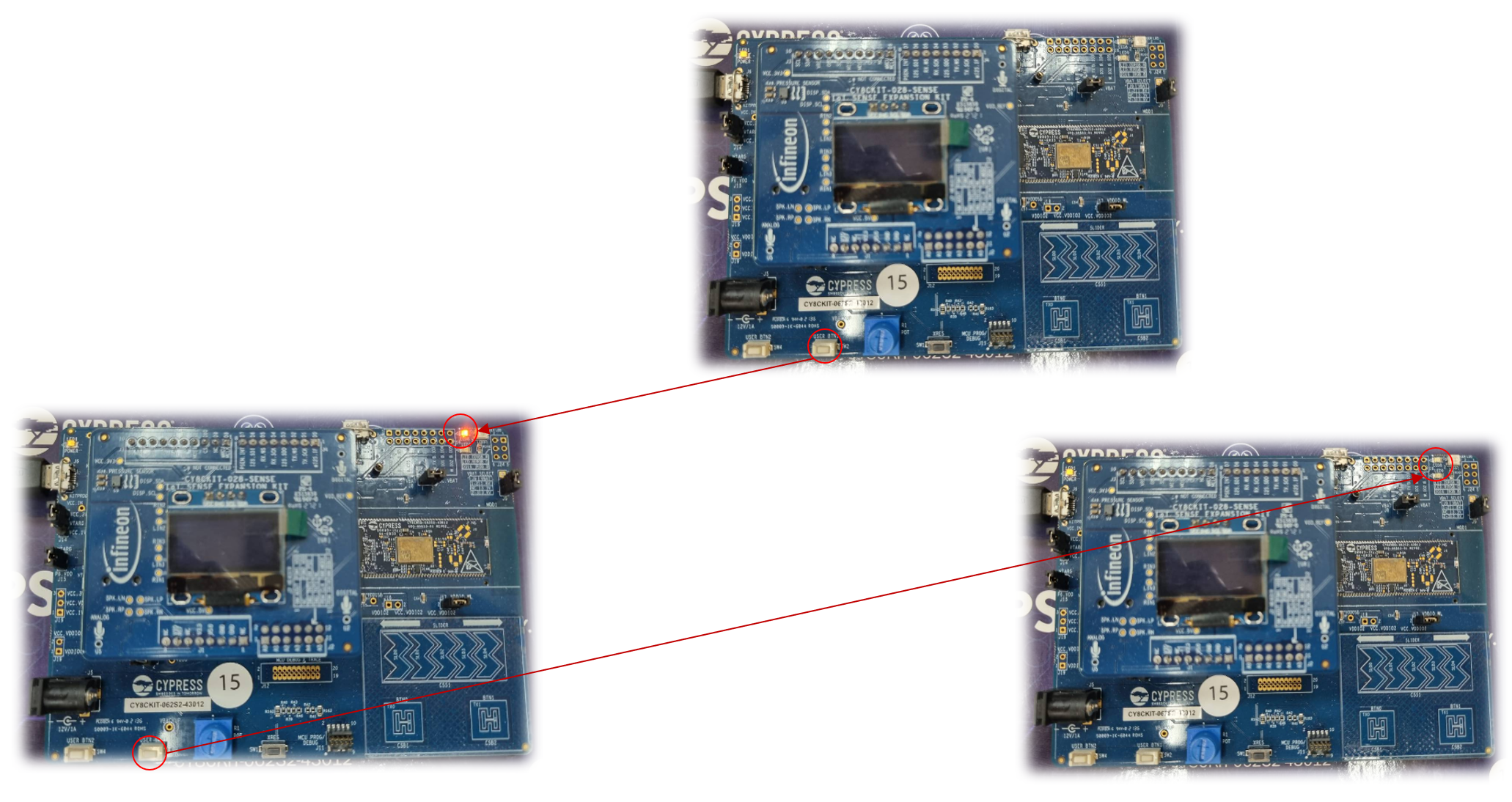
<figure><img src="https://1856353139-files.gitbook.io/~/files/v0/b/gitbook-x-prod.appspot.com/o/spaces%2F-MClo3nC-1US0rbK8Qau%2Fuploads%2FjxgczOoyo9bWUHB85nid%2Fimage.png?alt=media&#x26;token=87b97cf5-64bc-49ee-93e7-02e3adfd3cda" alt=""><figcaption><p>Press Button 1st time to Turn ON LED (toggle LED), Press Button 2nd time to Turn OFF LED</p></figcaption></figure>

> #### 🎉 <mark style="color:blue;">Congratulations! You can now complete Lab105</mark>

## Workshop:

#### Exercise 1: Change From USER LED to RGB Green/Red/Blue

#### Exercise 2: Add Loop LED to the Loop function

```
	//cyhal_syspm_deepsleep();
    	cyhal_gpio_write(CYBSP_LED_RGB_BLUE, CYBSP_LED_STATE_ON);
    	cyhal_system_delay_ms(500);

    	cyhal_gpio_write(CYBSP_LED_RGB_BLUE, CYBSP_LED_STATE_OFF);
    	cyhal_system_delay_ms(500);
```

## Supported toolchains (make variable 'TOOLCHAIN')

* GNU Arm® embedded compiler v10.3.1 (`GCC_ARM`) - Default value of `TOOLCHAIN`
* Arm® compiler v6.16 (`ARM`)
* IAR C/C++ compiler v9.30.1 (`IAR`)

## Supported kits (make variable 'TARGET')

* [PSoC™ 62S2 Wi-Fi Bluetooth® pioneer kit](https://www.infineon.com/CY8CKIT-062S2-43012) (`CY8CKIT-062S2-43012`)
* [PSoC™ 62S1 Wi-Fi Bluetooth® pioneer kit](https://www.infineon.com/CYW9P62S1-43438EVB-01) (`CYW9P62S1-43438EVB-01`)
* [PSoC™ 62S1 Wi-Fi Bluetooth® pioneer kit](https://www.infineon.com/CYW9P62S1-43012EVB-01) (`CYW9P62S1-43012EVB-01`)
* [PSoC™ 62S3 Wi-Fi Bluetooth® prototyping kit](https://www.infineon.com/CY8CPROTO-062S3-4343W) (`CY8CPROTO-062S3-4343W`)

## Related resources

| Resources                       | Links                                                                                                                                                      |
| ------------------------------- | ---------------------------------------------------------------------------------------------------------------------------------------------------------- |
| ModusToolbox™ Software Training | [link](https://www.dropbox.com/sh/waj898o4o8eccx0/AAB3hBBaIQo2OvJ5-fubGJIha/training-modustoolbox-level1-getting-started-master/Manual/Ch2-Tools.pdf?dl=0) |

## Other resources

Infineon provides a wealth of data at [www.infineon.com](http://www.infineon.com) to help you select the right device, and quickly and effectively integrate it into your design.

## Document history

Document title: *BILL\_MTB-105* – *GPIO-PDL Button Interrupt*

<table><thead><tr><th width="149">Version</th><th>Description of change</th></tr></thead><tbody><tr><td>1.0.0</td><td>Lab 105: Learn basic GPIO control with PSoC 6 using Interrupt Button to toggle the LED via HAL</td></tr></tbody></table>

## Authors:

* *Assoc. Prof. Wiroon Sriborrirux*
* *Mr. Sriengchhun Chheang*
* *Mr. Sabol Socare*<br>

<br>

***

© BDH Corporation, 2022-2023