# Reading potentiometer sensor value via an ADC PDL

## L*ab Objective:*

This lab demonstrates the process of reading a potentiometer sensor value through an Analog-to-Digital Converter (ADC) using a Peripheral Driver Library (PDL) on a PSoC 6 microcontroller.

## 🔥 Requirements

<table><thead><tr><th width="429">Resources</th><th>Links</th></tr></thead><tbody><tr><td>Computer</td><td>💻</td></tr><tr><td>ModusToolbox™ software v3.0 or later</td><td><a href="https://www.infineon.com/modustoolbox">Link</a></td></tr><tr><td>CY8CKIT-062S2-43012 Infineon Board</td><td><a href="https://github.com/Advance-Innovation-Centre-AIC/BIIL_MTB-100_Hello_World_and_LED_Blinking_Programming_Template/assets/88732241/0215501d-b774-4045-8e64-ef49e28d8404">Link</a></td></tr><tr><td>Technical Report</td><td><a href="https://www.dropbox.com/scl/fi/amaxc94pte0ut2i1r5ewx/Technical-Report-Lab00.paper?rlkey=b3xm3vrerz9xgv1glb30cvy9z&#x26;dl=0">dropbox</a></td></tr></tbody></table>

## 🚩 Let start

### Create Application

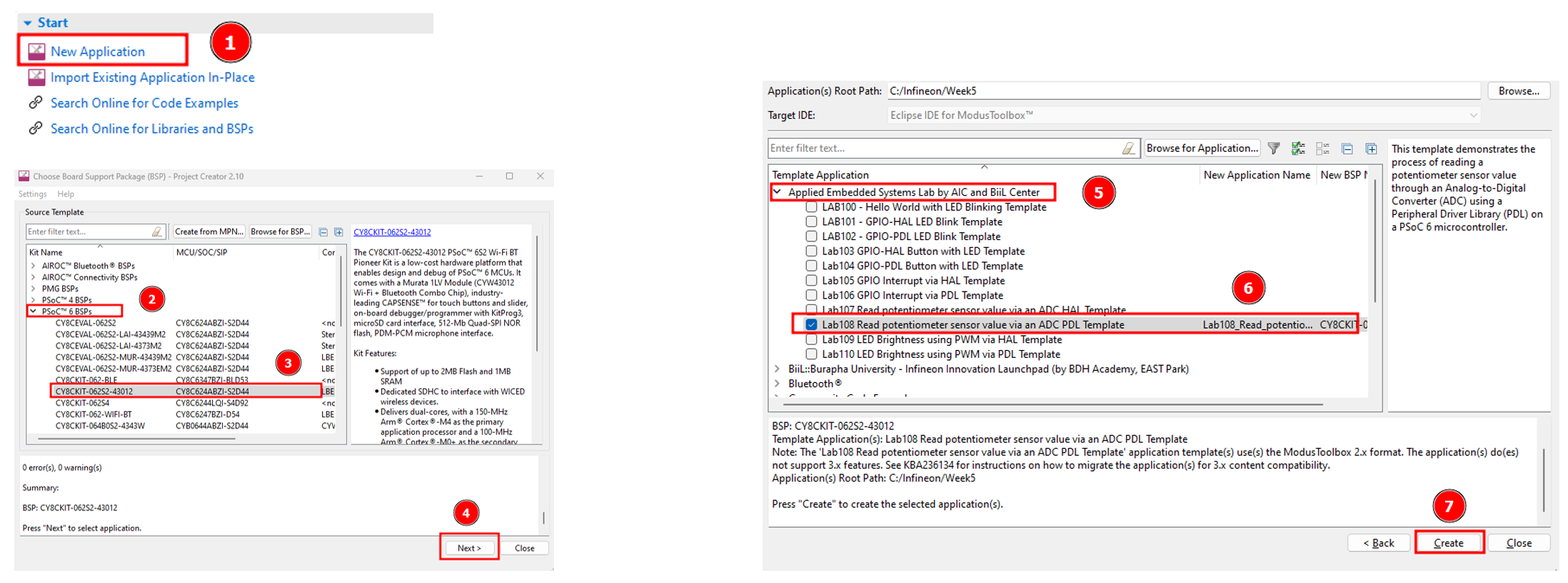
<figure><img src="https://1856353139-files.gitbook.io/~/files/v0/b/gitbook-x-prod.appspot.com/o/spaces%2F-MClo3nC-1US0rbK8Qau%2Fuploads%2FwEHmAxTv5XxgNbKdc8Wc%2Fimage.png?alt=media&#x26;token=1bf14ea4-6bda-4d97-9864-72e664a2bc7f" alt=""><figcaption><p>Create Application</p></figcaption></figure>

### Use Device Configurator and set the UART and ADC pin

#### Enable UART Pin:

<figure><img src="https://1856353139-files.gitbook.io/~/files/v0/b/gitbook-x-prod.appspot.com/o/spaces%2F-MClo3nC-1US0rbK8Qau%2Fuploads%2FoXV9Yeg59uD646POtB7T%2Fimage.png?alt=media&#x26;token=19e6c800-b3ec-4ba5-a213-8ad30aa5e865" alt=""><figcaption></figcaption></figure>

<figure><img src="https://1856353139-files.gitbook.io/~/files/v0/b/gitbook-x-prod.appspot.com/o/spaces%2F-MClo3nC-1US0rbK8Qau%2Fuploads%2FT3bu0Mb27MYiLEDvCghH%2Fimage.png?alt=media&#x26;token=76e60aef-93c4-482a-a662-ff90cd739447" alt=""><figcaption></figcaption></figure>

#### Config ADC

<figure><img src="https://1856353139-files.gitbook.io/~/files/v0/b/gitbook-x-prod.appspot.com/o/spaces%2F-MClo3nC-1US0rbK8Qau%2Fuploads%2FgABJNmoUDOpLdg19cjAV%2Fimage.png?alt=media&#x26;token=f4f7aba0-d543-4929-be70-6aa79b0ac223" alt=""><figcaption></figcaption></figure>

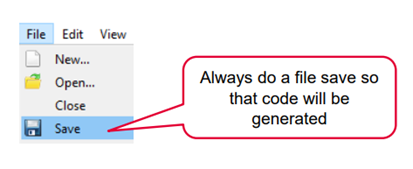
<figure><img src="https://1856353139-files.gitbook.io/~/files/v0/b/gitbook-x-prod.appspot.com/o/spaces%2F-MClo3nC-1US0rbK8Qau%2Fuploads%2FXHWy5Vy57s6vMJ7Rqnvb%2Fimage.png?alt=media&#x26;token=e75d9b4d-8427-43e5-9e34-6026d5ff7169" alt=""><figcaption><p>Always do a file save</p></figcaption></figure>

### Coding

* Coding: Open the main.c file and add the following code to the main(void) function.

{% code title="main.c" %}

```c
#include "cy_pdl.h"
#include "cyhal.h"
#include "cybsp.h"
#include "cy_retarget_io.h"
#include <stdio.h>

int main(void)
{
    cy_rslt_t result;

    // UART context variable
	cy_stc_scb_uart_context_t UART_context;

    /* Initialize the device and board peripherals */
    result = cybsp_init() ;
    if (result != CY_RSLT_SUCCESS)
    {
        CY_ASSERT(0);
    }

    __enable_irq();

    /* Configure and enable the UART peripheral */
	Cy_SCB_UART_Init(UART_HW, &UART_config, &UART_context);
	Cy_SCB_UART_Enable(UART_HW);

	// Initialize the AREF - block needed by ADC_HW ADC
	Cy_SysAnalog_Init(&AREF_config);
	// Initialize AREF
	Cy_SysAnalog_Enable();

	// Initialize the ADC
	Cy_SAR_Init(ADC_HW, &ADC_config);
	// Enable the ADC
	Cy_SAR_Enable(ADC_HW);

	int32_t ADCresult = 0; // ADC conversion result
	int32_t mVolts = 0; // Var to store voltage conversion of ADC result

    for (;;){
    	// Start a single conversion
		Cy_SAR_StartConvert(ADC_HW, CY_SAR_START_CONVERT_SINGLE_SHOT);
		if(Cy_SAR_IsEndConversion(ADC_HW, CY_SAR_WAIT_FOR_RESULT) == CY_SAR_SUCCESS){
			ADCresult = Cy_SAR_GetResult32(ADC_HW, 0);
			mVolts = Cy_SAR_CountsTo_mVolts(ADC_HW, 0, ADCresult);
		}
		char stringBuffer[20];
		sprintf(stringBuffer, "ADC = %ld\r\n", mVolts);
		Cy_SCB_UART_PutString(UART_HW, stringBuffer);
		Cy_SysLib_Delay(100);
    }
}
```

{% endcode %}

### Build the Application

<figure><img src="https://1856353139-files.gitbook.io/~/files/v0/b/gitbook-x-prod.appspot.com/o/spaces%2F-MClo3nC-1US0rbK8Qau%2Fuploads%2FirHJDVbXLsfXd0JnO5Rx%2Fimage.png?alt=media&#x26;token=7d57181f-59d6-47bb-a9e1-c4392571e675" alt=""><figcaption><p>Build Application</p></figcaption></figure>

### Launching the Application

<figure><img src="https://1856353139-files.gitbook.io/~/files/v0/b/gitbook-x-prod.appspot.com/o/spaces%2F-MClo3nC-1US0rbK8Qau%2Fuploads%2FTGx2bNHWsNPKLPTii2h8%2Fimage.png?alt=media&#x26;token=78f2272b-5e9c-4a2f-853a-990d045e14d7" alt=""><figcaption><p>Launching Application</p></figcaption></figure>

> Note: Before launching the program to the board, make sure that you have already connected the board to the computer through a USB cable.

<figure><img src="https://github.com/Advance-Innovation-Centre-AIC/BIIL_MTB-100_Hello_World_and_LED_Blinking_Programming_Template/assets/88732241/7a6bb6ef-cb63-4613-98a1-42f9617ad724" alt="" width="188"><figcaption><p>set up USB cable</p></figcaption></figure>

### Result&#x20;

<figure><img src="https://1856353139-files.gitbook.io/~/files/v0/b/gitbook-x-prod.appspot.com/o/spaces%2F-MClo3nC-1US0rbK8Qau%2Fuploads%2F8g94A7AOUq6vbwnGQofz%2Fimage.png?alt=media&#x26;token=8019f211-e54a-48d2-ac83-05e57bc9b57f" alt=""><figcaption><p>Once the device is set up, run the program. The microcontroller will continuously read the potentiometer's analog value, convert it to a digital signal through the ADC, and then convert that signal to millivolts using the PDL functions.</p></figcaption></figure>

> #### 🎉 <mark style="color:blue;">Congratulations! You can now complete Lab108</mark>

## Supported toolchains (make variable 'TOOLCHAIN')

* GNU Arm® embedded compiler v10.3.1 (`GCC_ARM`) - Default value of `TOOLCHAIN`
* Arm® compiler v6.16 (`ARM`)
* IAR C/C++ compiler v9.30.1 (`IAR`)

## Supported kits (make variable 'TARGET')

* [PSoC™ 62S2 Wi-Fi Bluetooth® pioneer kit](https://www.infineon.com/CY8CKIT-062S2-43012) (`CY8CKIT-062S2-43012`)
* [PSoC™ 62S1 Wi-Fi Bluetooth® pioneer kit](https://www.infineon.com/CYW9P62S1-43438EVB-01) (`CYW9P62S1-43438EVB-01`)
* [PSoC™ 62S1 Wi-Fi Bluetooth® pioneer kit](https://www.infineon.com/CYW9P62S1-43012EVB-01) (`CYW9P62S1-43012EVB-01`)
* [PSoC™ 62S3 Wi-Fi Bluetooth® prototyping kit](https://www.infineon.com/CY8CPROTO-062S3-4343W) (`CY8CPROTO-062S3-4343W`)

## Related resources

| Resources                       | Links                                                                                                                                                      |
| ------------------------------- | ---------------------------------------------------------------------------------------------------------------------------------------------------------- |
| ModusToolbox™ Software Training | [link](https://www.dropbox.com/sh/waj898o4o8eccx0/AAB3hBBaIQo2OvJ5-fubGJIha/training-modustoolbox-level1-getting-started-master/Manual/Ch2-Tools.pdf?dl=0) |

## Other resources

Infineon provides a wealth of data at [www.infineon.com](http://www.infineon.com) to help you select the right device, and quickly and effectively integrate it into your design.

## Document history

Document title: *BILL\_MTB-108* – Read potentiometer sensor value via an ADC PDL<br>

<table><thead><tr><th width="149">Version</th><th>Description of change</th></tr></thead><tbody><tr><td>1.0.0</td><td>Lab 108: Learn basic GPIO control with PSoC 6, using ADC read potentiometer sensor value via PDL</td></tr></tbody></table>

## Authors:

* *Assoc. Prof. Wiroon Sriborrirux*
* *Mr. Sriengchhun Chheang*
* *Mr. Sabol Socare*<br>

<br>

***

© BDH Corporation, 2022-2023